
Binary Encoding and Error Detection
Students encode text as binary, identify how bit errors alter stored information, and use a parity bit to detect transmission errors.

Illustrations are auto-generated and may be placeholders. They can be refreshed to match the narration.
Bits, Bytes, and Binary Values
A bit is the smallest unit of digital data. It has one of two values: 0 or 1. Eight bits usually form one byte, a unit commonly used to measure stored information. Binary numbers use powers of two instead of powers of ten. From right to left, the places in an 8-bit value represent 1, 2, 4, 8, 16, 32, 64, and 128. For example, 00001101 represents 13 because the 8, 4, and 1 places contain ones, and 8 + 4 + 1 = 13. Keeping units visible helps prevent mistakes: bits measure individual binary positions, while bytes measure groups of eight bits. Digital systems use long patterns of bits to represent numbers, text, images, sound, and instructions.

Encoding Characters in Binary
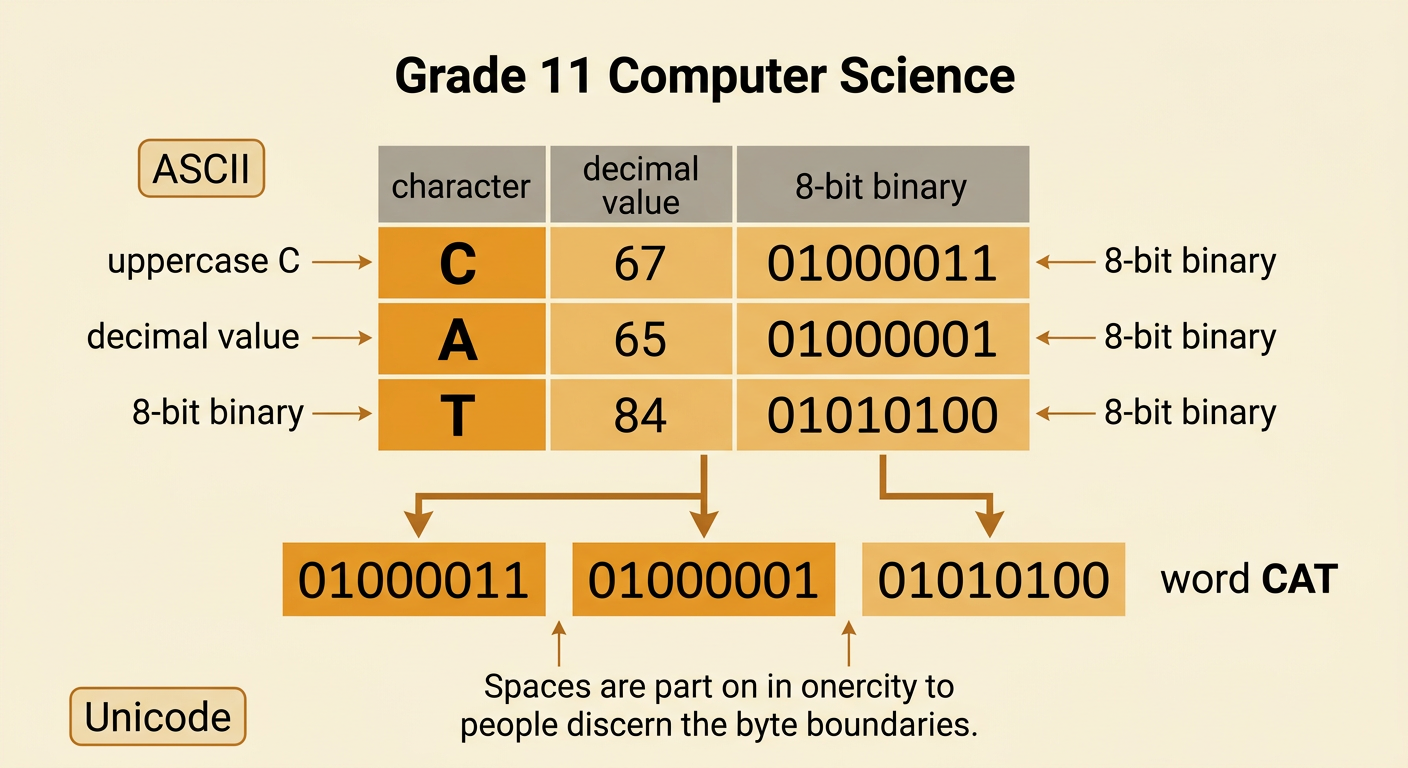
A character encoding assigns a number to each letter, digit, punctuation mark, or control symbol. The number is then stored as binary. ASCII is an influential character-encoding standard. Standard ASCII uses seven bits, though ASCII values are often displayed or stored in 8-bit bytes with a leading zero. For example, uppercase C has decimal value 67 and binary value 01000011. Uppercase A is 65, or 01000001, and uppercase T is 84, or 01010100. Therefore, the word CAT can be stored as three bytes: 01000011 01000001 01010100. The spaces shown between bytes help humans read the pattern, but they are not part of the encoded word. Modern systems commonly use Unicode so that far more writing systems and symbols can be represented, while retaining ASCII values for many basic characters.
How Transmission Errors Change Data
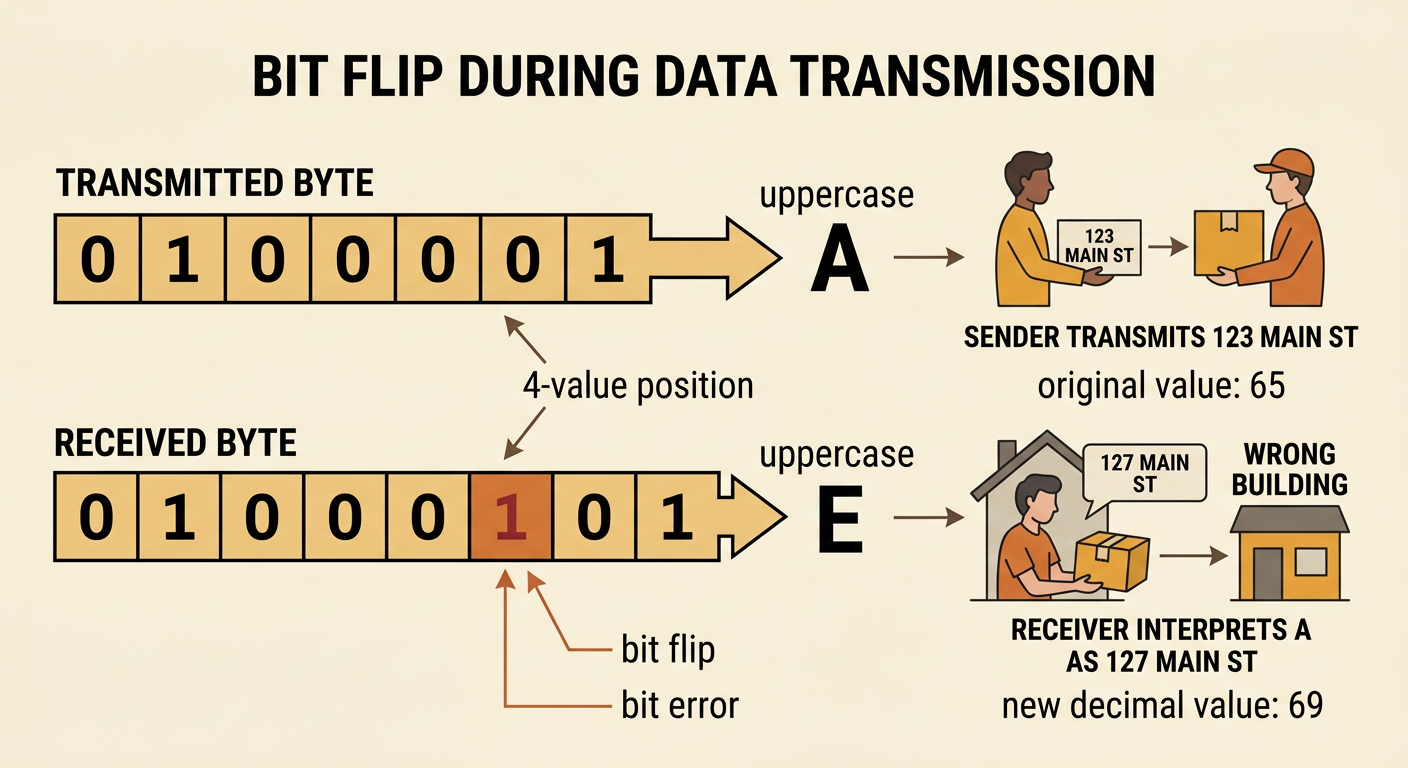
During transmission or storage, a bit can accidentally change from 0 to 1 or from 1 to 0. This is called a bit error or bit flip. Suppose the ASCII byte for uppercase A, 01000001, is transmitted. If the bit in the 4-value position changes from 0 to 1, the received byte becomes 01000101. Its decimal value is now 69 rather than 65, so it represents uppercase E instead of uppercase A. One altered bit has changed the stored information. Digital transmission has an advantage over analog transmission because receivers can distinguish between two expected signal states and regenerate clean bit patterns. However, interference, damaged storage, or weak signals can still cause errors. Error-detection methods add extra information so a receiver can recognize that a pattern may have changed.
Adding and Checking Parity Bits
A parity bit is an extra bit added to a data pattern so the total number of ones follows a rule. With even parity, the complete pattern must contain an even number of ones. Consider the seven-bit ASCII data for uppercase C: 1000011. It contains three ones, so the sender appends a parity bit of 1. The transmitted codeword is 10000111, which contains four ones. The receiver counts the ones. If one bit flips, the total becomes odd, so the receiver detects an error and can request the data again. The parity bit does not identify which bit changed, and it does not correct the data. It also fails to detect an even number of bit flips because the total number of ones may remain even. Thus, parity is simple and useful, but limited.

Testing an Error-Detection Scheme
An error-detection scheme should be tested with controlled cases. Begin with the even-parity codeword for C, 10000111, which contains four ones. First, transmit it without changes; the receiver counts four ones and accepts it. Next, flip one bit. The resulting pattern has an odd number of ones, so the receiver detects an error. Then flip two bits. The pattern again has an even number of ones, so a basic parity check may incorrectly accept it. Students can record detected errors per trial or calculate an error rate in errors per transmitted bit, keeping the units clear. Such tests reveal both the advantage and the limitation of parity. Historically, the shift from analog to digital systems made automatic checking easier, but the need to protect information continued. Modern networks and storage devices often use stronger checks that can detect longer or multiple-bit errors.
