
Code a Looping Community Message
Students create a short animated message about responsible community participation and use a loop to repeat a visual or movement pattern.

Illustrations are auto-generated and may be placeholders. They can be refreshed to match the narration.
Explore Repeating Patterns
A repeating pattern follows a rule that happens again and again. Look for the part called the pattern unit, which is the smallest part that repeats. For example, imagine an animation in which a star moves right 10 steps, turns blue, moves right 10 more steps, and turns yellow. If these four actions repeat, the star keeps making the same movement and color pattern. You can also describe an arithmetic pattern. After each move, the star’s position is 10, 20, 30, and 40 steps from its starting point. Each number increases by 10. Predict what will happen next by using the rule: the star will move to 50 steps. Finding the rule helps you build a loop that repeats actions correctly.

Choose a Community Message
A community includes people who live, learn, work, or play together. Responsible participation means taking helpful actions, listening to others, following fair rules, and caring for shared spaces. Choose one short message that encourages people to participate. For example, your message could be “Keep Our Park Clean.” Your animation might show a character picking up litter and placing it in a trash can. Another possible message is “Take Turns and Listen,” with two characters passing a talking stick back and forth. Make sure the message is respectful, easy to understand, and connected to an action people can take. In a democracy, people help their community by sharing ideas, making choices, solving problems together, and accepting responsibility for their actions.

Plan the Animation
Before coding, plan what viewers will see and what actions will repeat. Draw a storyboard with a beginning, a repeating middle, and an ending. For a “Keep Our Park Clean” animation, the beginning could show the message on the screen. In the middle, a character could walk to a piece of litter, pick it up, and place it in a trash can. That action could repeat three times. The ending could say, “Everyone can help!” Use criteria and constraints to guide your plan. Criteria are things the animation should do, such as show a clear message and include a loop. Constraints are limits, such as using one character, finishing in 20 seconds, or using only three backgrounds. Compare possible plans and choose the one that best meets the criteria within the limits.

Code a Loop
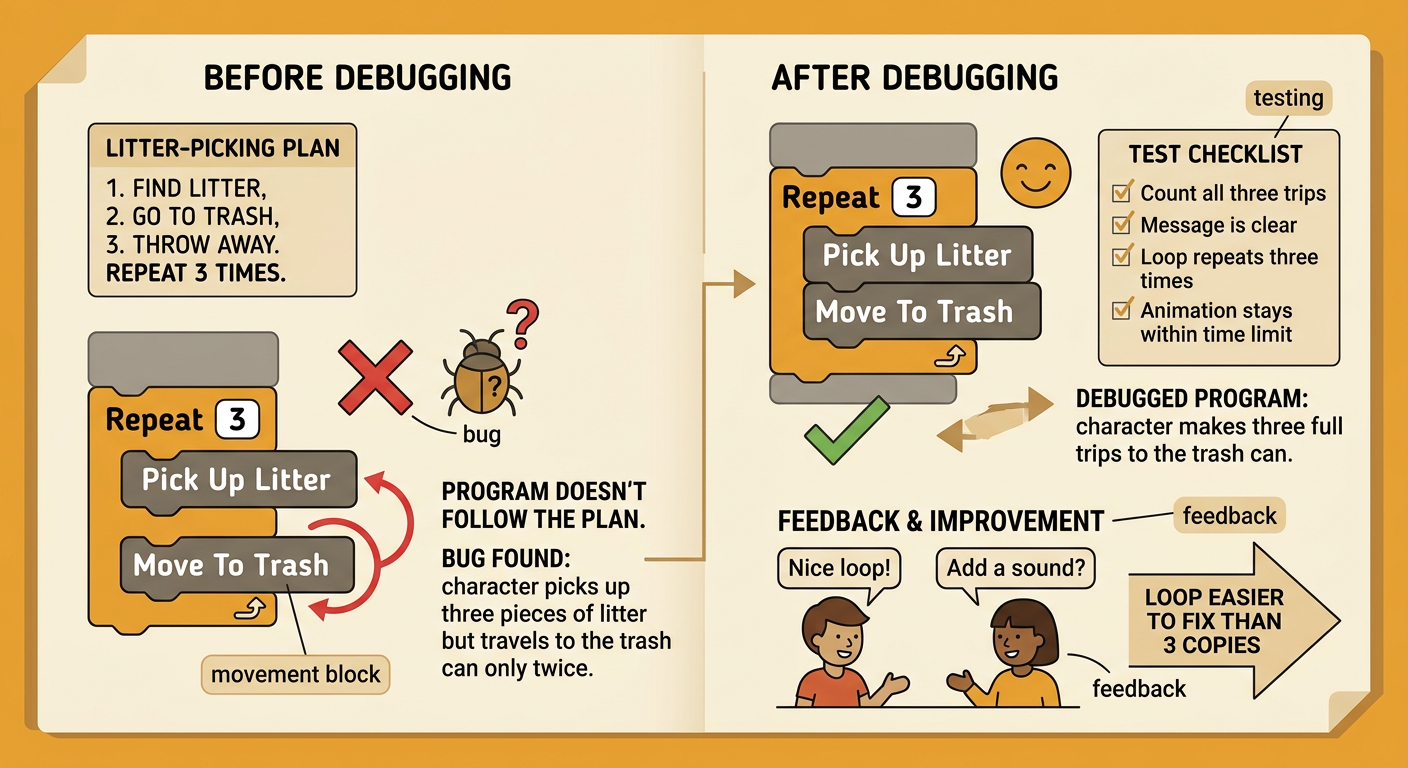
A loop tells a computer to repeat the same instructions. Loops make code shorter and easier to change. Without a loop, you would need to write the cleanup actions three separate times. With a loop, place the repeated actions inside a “repeat 3” block. For example, code the character to move 20 steps, say “I can help!” for one second, pick up one piece of litter, and move to the trash can. The loop runs those instructions three times in the same order. Count the pattern to check it: after each loop, the character has completed 1, 2, and then 3 cleanup actions. Instructions that should happen only once, such as displaying the title or final message, belong outside the loop.

Test and Improve
Run the animation and watch carefully from beginning to end. Testing helps you find bugs, which are problems that make the program behave differently from your plan. Check whether the message is clear, the loop repeats the correct number of times, and the animation fits the time limit. Suppose the character picks up three pieces of litter but moves to the trash can only twice. Look inside the loop. The movement block may have been placed outside it. Move that block into the loop, run the program again, and count all three trips. You can also compare two solutions. A loop that repeats three times is shorter and easier to edit than three separate sets of identical blocks. Ask a partner for feedback, make one useful change, and test again to see whether the change improved the animation.
Share the Message
Present your animation to classmates or another audience. First, state the community message and explain why it matters. Then play the animation and point out the repeating pattern. For example, you might say, “My loop repeats the cleanup action three times to show that caring for a park is an ongoing responsibility.” Explain how your program meets the criteria, such as including a clear message, a visible action, and a loop. Also name one constraint you followed, such as keeping the animation under 20 seconds. Invite viewers to share what they understood and suggest one improvement. Listen respectfully, thank them, and consider their ideas. Sharing your work is also responsible participation because you are communicating an idea that may help the community make thoughtful choices.
