
Computer Inputs and Outputs
Students identify common input and output devices and explain whether each device sends information to or receives information from a computer.
Illustrations are auto-generated and may be placeholders. They can be refreshed to match the narration.
Meet the Computer Devices
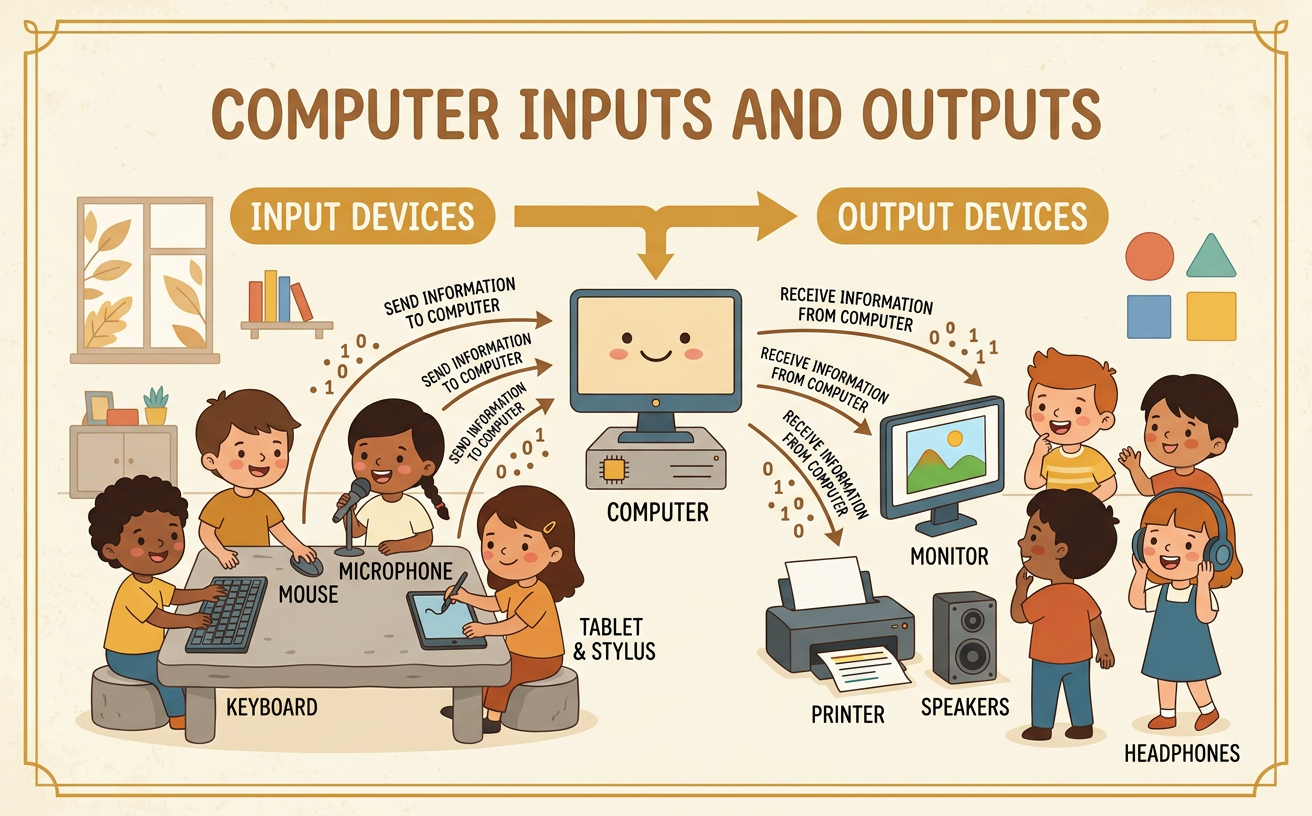
A computer uses different devices to help people share information with it. A keyboard, mouse, microphone, monitor, speakers, and printer are computer devices. Each device has a special job. Some devices send information to the computer. These are called input devices. Other devices receive information from the computer. These are called output devices. For example, when Maya presses the letter A on a keyboard, the keyboard sends her choice to the computer. The keyboard is an input device. Then the computer can show the letter A on the monitor. The monitor is an output device. Look closely at each device and describe its shape, parts, and job.

Information Goes In
An input device sends information to a computer. A keyboard is an input device because pressing its keys sends letters, numbers, or commands to the computer. A mouse is an input device because moving and clicking it tells the computer what to select. A microphone is also an input device because it sends a person’s voice or other sounds to the computer. Imagine that Leo wants to record his name. He says, “Leo,” into a microphone. The microphone sends the sound of his voice into the computer. The computer can then save the recording. To identify an input device, ask, “Does this device send information to the computer?” If the answer is yes, it is an input device.

Information Comes Out
An output device receives information from a computer and shares it with a person. A monitor is an output device because it receives information from the computer and shows pictures or words. Speakers are output devices because they receive information and play sounds. A printer is an output device because it receives information and puts pictures or words on paper. For example, Ava draws a red flower on a computer. The computer sends the picture to the monitor, so Ava can see it. If she chooses to print, the computer sends the picture to the printer. A paper copy comes out. To identify an output device, ask, “Does this device receive information from the computer?”

Sort Input and Output Devices
We can sort computer devices by the direction information travels. Make two groups: input devices and output devices. Place a keyboard, mouse, and microphone in the input group because they send information to the computer. Place a monitor, speakers, and printer in the output group because they receive information from the computer. Try sorting one device at a time. First, name the device. Next, describe what it does. Then ask whether information goes into or comes out of the computer. For example, a mouse sends a click to the computer, so it belongs in the input group. Speakers receive sound information from the computer, so they belong in the output group. Use arrows to check your sorting.

Share and Explain
Now describe one computer device and explain its job. Speak clearly and include details about what the device looks like, how a person uses it, and which way information moves. You can use this sentence pattern: “A microphone is an input device. It sends sound to the computer.” Add another detail, such as, “It has a place to speak into.” A classmate or teacher may ask a question to help you say more. For example, someone might ask, “How do you use it?” You could answer, “I speak into it to record my voice.” You can also explain an output device: “A printer is an output device. It receives information from the computer and makes a paper copy.”
