
Debugging Code with Numerical Expressions
Students trace and debug short pseudocode programs by evaluating numerical expressions in the correct order and explaining how changes to parentheses affect the output.

Illustrations are auto-generated and may be placeholders. They can be refreshed to match the narration.
Programs as Ordered Instructions
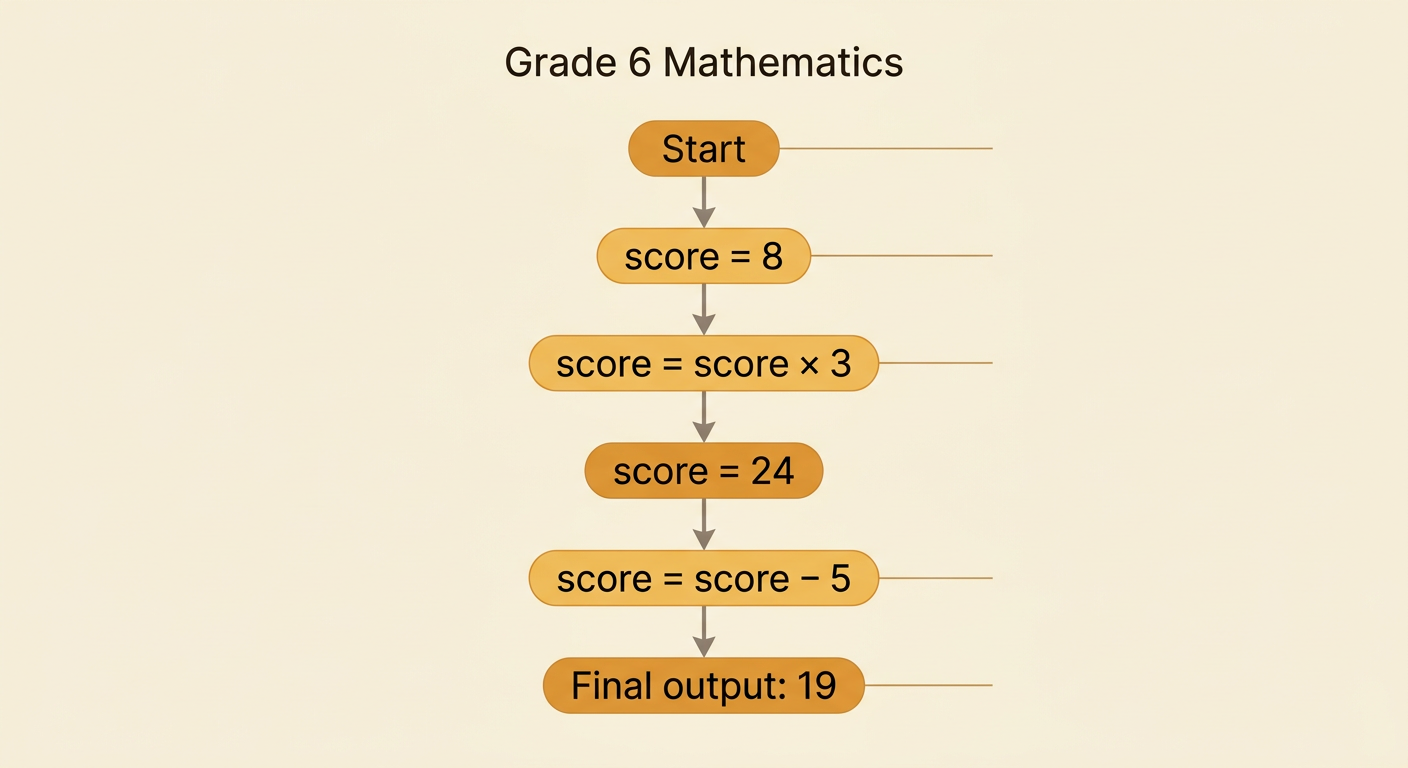
A program is a sequence of instructions that a computer follows in order. Pseudocode uses everyday words and mathematical symbols to represent those instructions. Consider this program: set score to 8, multiply score by 3, and then subtract 5. The computer begins with score = 8. After multiplying by 3, score becomes 24. After subtracting 5, the final value is 19. Changing the order changes the result. If the computer subtracts 5 before multiplying by 3, it calculates (8 − 5) × 3 and gets 9. When tracing a program, read from the first line to the last line unless an instruction says to repeat or skip a step. Record each new value so that you can explain exactly how the program produced its output.
Reading Variables and Assignment Statements
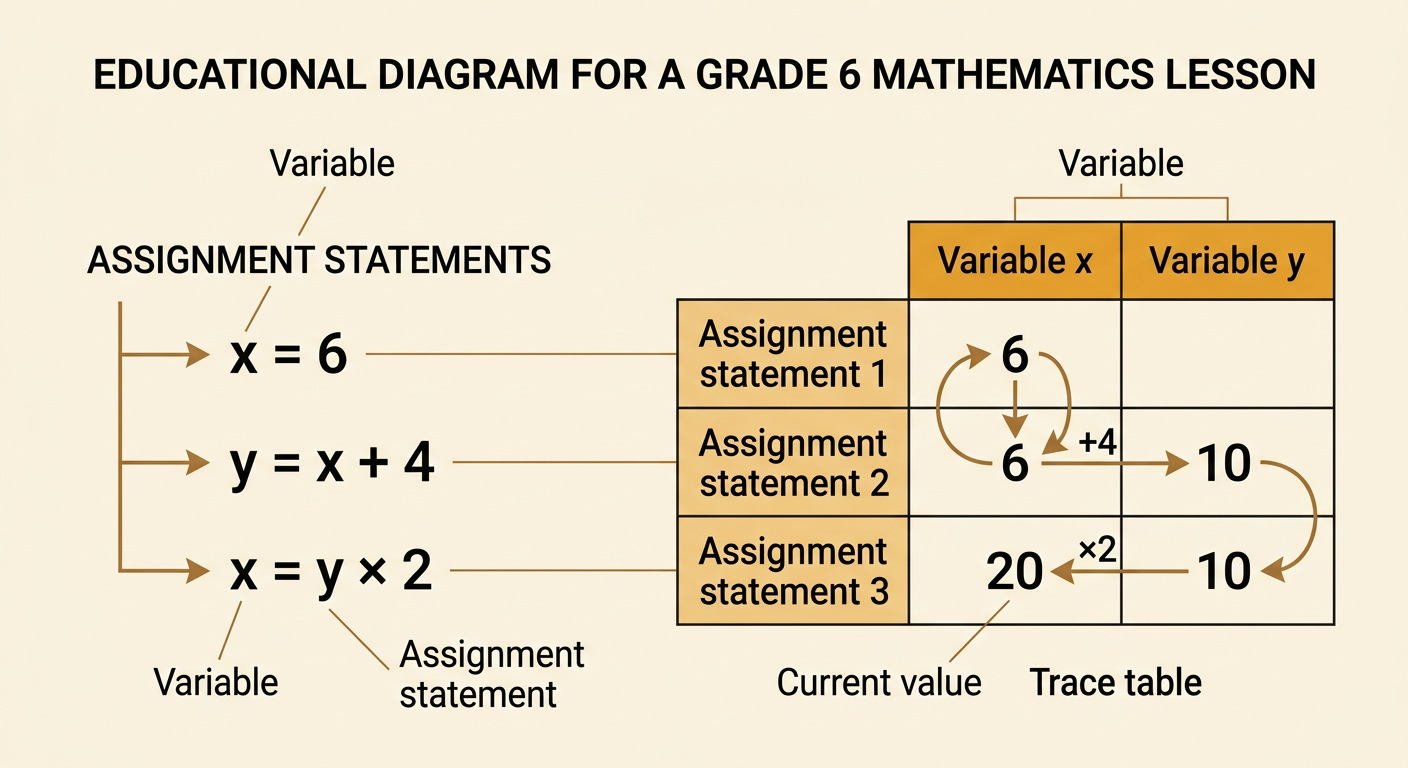
A variable is a name that stores a value. In pseudocode, an assignment statement places a value into a variable. For example, x = 6 assigns the value 6 to x. The statement y = x + 4 uses the current value of x, so y becomes 10. A later statement, x = y × 2, replaces the old value of x with 20. Assignment statements are read in order because a variable’s value can change during a program. To trace the program, make a table with one column for each variable and one row for each instruction. After every assignment, update the changed variable and carry the other values forward. This record prevents you from accidentally using an old value. It also shows how each expression is evaluated at the specific values currently stored in the variables.
Tracing Expressions Step by Step
When one instruction contains several operations, use the conventional order of operations. Evaluate grouping symbols first, then exponents, then multiplication and division from left to right, and finally addition and subtraction from left to right. Suppose a program sets a = 4 and then calculates result = 3 + a × (7 − 5). First evaluate the parentheses: 7 − 5 = 2. Substitute the current value of a to get 3 + 4 × 2. Next multiply: 4 × 2 = 8. Finally add: 3 + 8 = 11. Do not simply work from left to right, because adding 3 + 4 first would produce an incorrect result. Writing each equivalent expression on a separate line makes the calculation easy to check and helps reveal where an error occurred.
Finding and Fixing Bugs
A bug is an error that causes a program to produce an unintended output. Some bugs come from putting parentheses in the wrong place. Imagine that a game awards 5 points for each collected star and then adds a 10-point bonus. With stars = 4, the intended expression is points = 5 × stars + 10. It gives 5 × 4 + 10 = 30. A programmer accidentally writes points = 5 × (stars + 10). That version adds first and gives 5 × 14 = 70. To debug the program, compare the intended rule with the written expression, trace both versions, and locate the first step where their values differ. Then correct the grouping. Parentheses do not merely make an expression look organized; they can change which operation happens first and therefore change the program’s output.
Testing the Corrected Program
After fixing a bug, test the corrected program with several input values. One successful test may be a coincidence, so include simple, typical, and boundary values such as 0. Suppose the corrected rule is points = 5 × stars + 10. For stars = 0, the output should be 10. For stars = 2, the output should be 20. For stars = 6, the output should be 40. Evaluate the expression carefully for each input and compare the actual output with the expected output. If every result matches, the evidence supports the correction. If one result differs, trace that test line by line to find the remaining bug. Also check whether each output makes sense in the situation: the 10-point bonus should remain even when no stars are collected, and every additional star should increase the score by exactly 5 points.