
Design and Test a Strong Passphrase
Students apply simple security criteria to compare sample passphrases and design a memorable, hard-to-guess passphrase without sharing real account information.

Illustrations are auto-generated and may be placeholders. They can be refreshed to match the narration.
Why Passphrases Protect Information
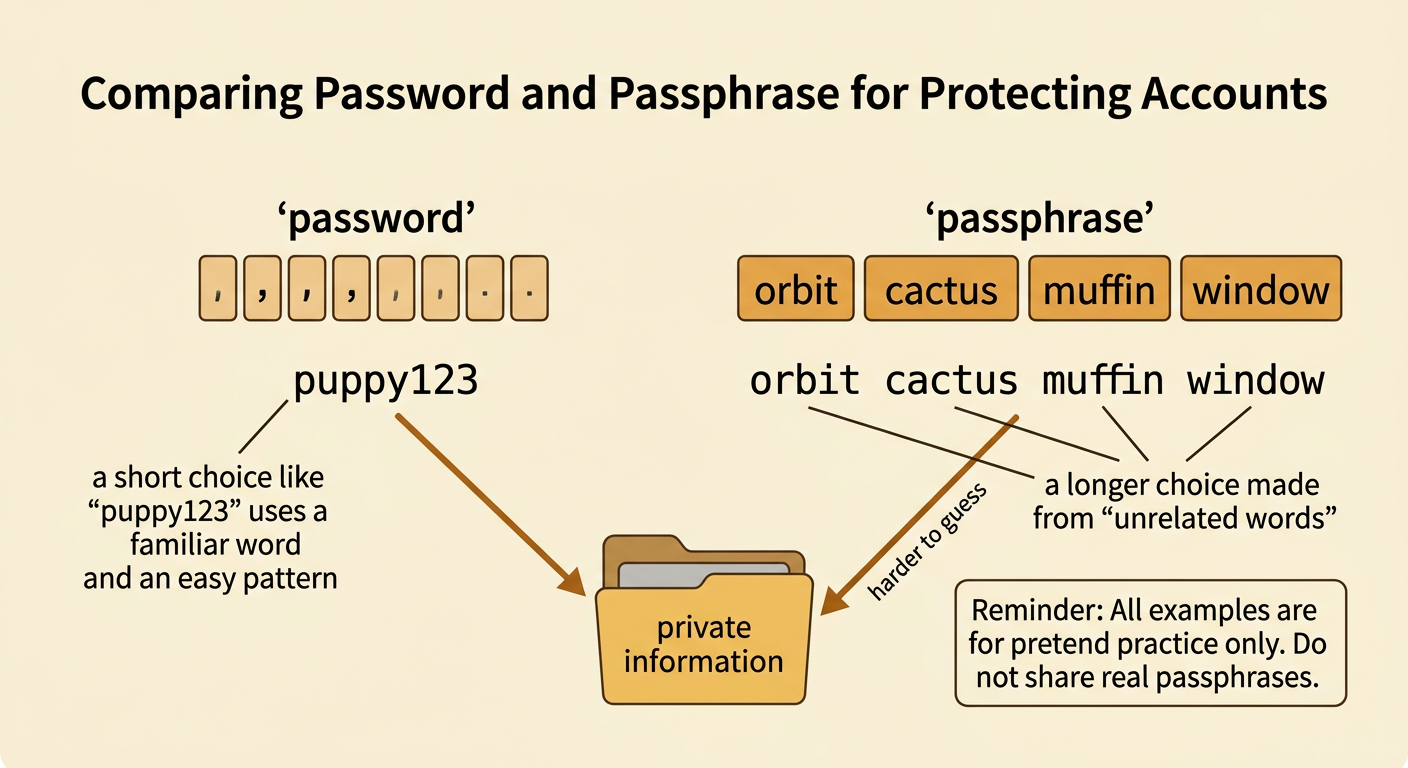
A password is a secret used to open an account. A passphrase is a longer password made from several words. Its job is to help keep private information away from people who should not see it. A long phrase made from unrelated words is usually harder to guess than a short word or a simple pattern. For example, “orbit cactus muffin window” is harder to guess than “puppy123.” Length helps, but no passphrase can guarantee perfect safety. People also need rules, such as not sharing passphrases and using a different one for each account. These rules protect both individuals and communities. During this lesson, use only pretend classroom examples. Never write, say, or show a passphrase from a real account, even to a friend or classmate.
Set Security Criteria
Criteria are features that a solution should have. Constraints are limits or rules that a solution must follow. The class can make a checklist for practice passphrases. Give one point for each criterion met: at least 16 characters, at least four unrelated words, no names or other personal details, and no common saying or easy pattern. Add a fifth point if the phrase is planned for only one account. A constraint is that students must create pretend examples, not use real account information. Another constraint may be a website rule requiring a number or symbol. For example, “red blue green yellow” is long, but its words follow an easy color pattern. It would not earn every point. The checklist turns security ideas into a simple mathematical model that helps the class compare designs fairly.

Score Sample Passphrases
Use the class checklist to compare pretend passphrases. Consider “Puppy123,” “SoccerMia2015,” and “PurpleRiverTacoLamp.” “Puppy123” is short, uses fewer than four words, and follows a common number pattern. “SoccerMia2015” is longer, but it may reveal a favorite activity, a name, and a meaningful year. Personal facts can be easier for someone who knows the user to guess. “PurpleRiverTacoLamp” is at least 16 characters, contains four mostly unrelated words, and does not show personal information. On a four-point checklist for length, word count, privacy, and unpredictability, the samples might score 0, 1, and 4. Discuss any disagreement by pointing to evidence from the checklist. Scores help compare examples, but they do not prove that an account is completely safe.

Create a Practice Passphrase
Now design a passphrase for a pretend classroom account. Do not use your real name, birthday, address, school, pet, team, or favorite character. One safe method is to choose four or more unrelated words from random classroom word cards. Suppose the cards show “orbit,” “cactus,” “muffin,” and “window.” The practice passphrase could be “orbit-cactus-muffin-window.” To remember the order, imagine a muffin floating past a cactus and landing on a window in orbit. If a pretend website requires a number or symbol, follow that rule without adding a birthday or an easy sequence such as 1234. Check the design against every criterion. This example is public because it appears in the lesson, so it must never be used for a real account.

Peer Test and Improve
Work with a partner to test only a pretend passphrase made for this activity. Never show a partner a real password or passphrase. The tester reads each checklist item, records the score, and gives kind, specific evidence. For example, a tester might say, “Your phrase is long and has four words, but ‘Monday Tuesday Wednesday Thursday’ follows an easy pattern.” The designer could improve it to “Monday otter lantern peach,” then check it again. Partners should not ask for personal facts, try to sign in to an account, or copy the practice phrase for later use. Take turns speaking, listening, and asking questions such as, “Which criterion should we improve?” Comparing two versions shows whether the changes better meet the criteria and constraints. Respectful testing helps the whole class learn safely.

Review Safe Password Habits
Strong passphrases work best with other safe habits. Keep real passphrases private, and use a different one for each account so one stolen secret does not open several accounts. Do not send a passphrase in a message or enter it after clicking an unexpected link. Ask a trusted adult for help if a website, game, or message requests private information. When available, use multifactor authentication, which asks for another form of proof in addition to a passphrase. A family may also use a trusted password manager to create and store unique secrets. If you think a passphrase was seen or stolen, tell a trusted adult and change it promptly. Shared security rules address a community need: they help classmates, families, and online groups protect information and act responsibly.
