
Detecting Phishing with Digital Evidence
Students inspect message content, sender details, and URLs to identify phishing attempts and evaluate a practical detection checklist.

Illustrations are auto-generated and may be placeholders. They can be refreshed to match the narration.
Phishing and Social Engineering
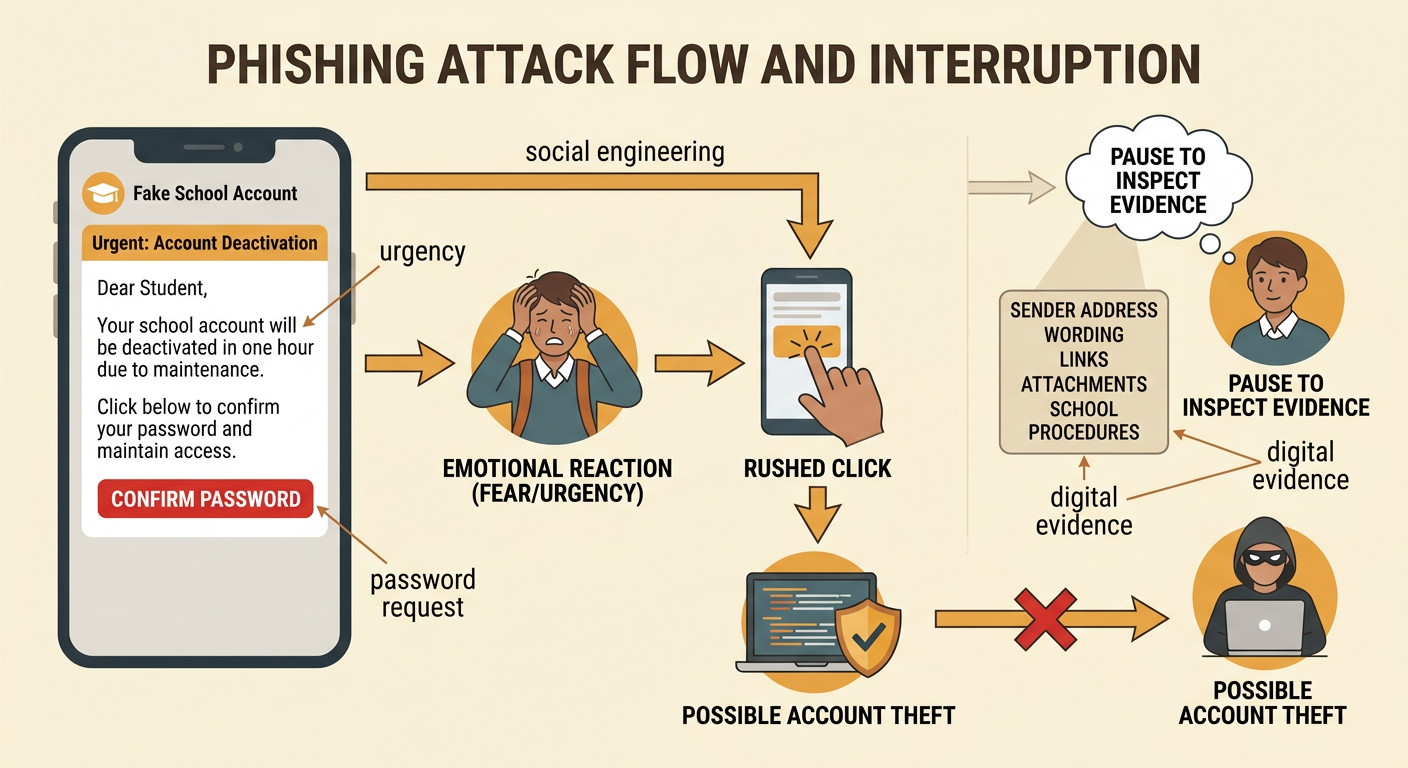
Phishing is an attempt to steal information, money, or account access by pretending to be a trustworthy source. It is a form of social engineering, which means manipulating people rather than directly breaking a computer system. A phishing message may create fear, curiosity, urgency, or excitement so that the recipient acts without checking the evidence. For example, an email might say, “Your school account will close in one hour. Confirm your password now.” The urgent deadline and request for a password are evidence of manipulation. However, one clue alone does not prove that a message is phishing. A careful decision uses several details, including the exact sender address, wording, links, attachments, and whether the request matches normal school procedures. Digital evidence supports a conclusion that can be explained and checked by others.
Common Warning Signs
Common phishing warning signs include unexpected requests, urgent threats, offers that seem unusually generous, requests for passwords or payment, unfamiliar attachments, and links that do not match the claimed organization. Poor spelling can be a clue, but polished writing does not prove that a message is safe. For example, a message may display a school logo and state, “You received a refund. Open RefundForm.zip and sign in today.” The unexpected refund, compressed attachment, and demand for quick action create multiple reasons for concern. Students should quote or record specific evidence instead of saying only that a message “looks strange.” A useful claim might be, “The message is suspicious because it requests a login through an unexpected attachment and sets an artificial deadline.” Combining independent clues produces a stronger classification than relying on one visual feature.
Inspecting Senders and URLs
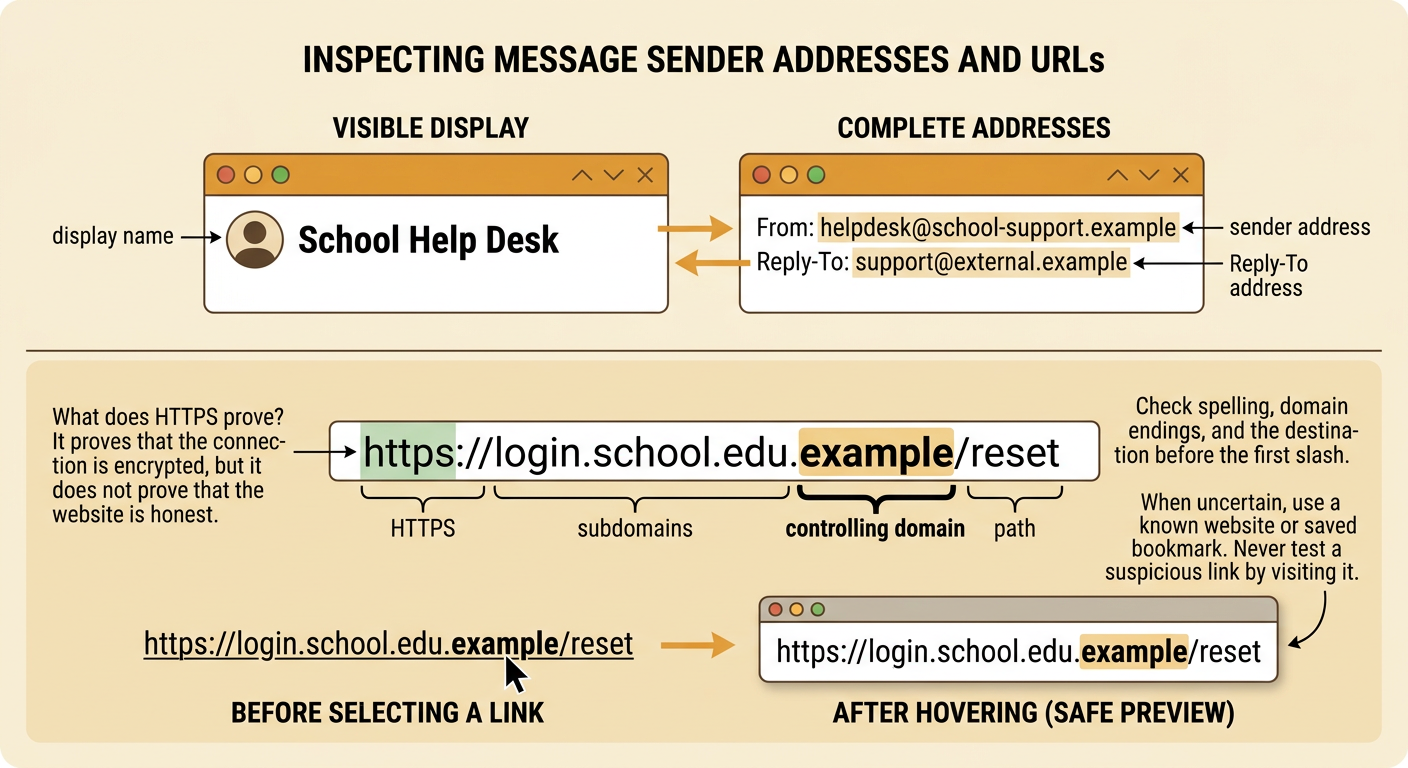
A display name can be copied, so students should inspect the complete sender address. “School Help Desk” might actually come from helpdesk@school-support.example rather than the school’s official domain. Also compare the From address with any Reply-To address because a mismatch may redirect responses. Before selecting a link, hover over it or use a safe preview to reveal its destination. In https://login.school.edu.example/reset, the controlling domain is example, not school.edu; words placed earlier in the address can be misleading subdomains. Check spelling, domain endings, and the destination before the first slash. HTTPS means the connection is encrypted, but it does not prove that the site is honest. When uncertain, open a known website or saved bookmark instead of using the message link. Do not test a suspicious link by visiting it.
Classifying Sample Messages
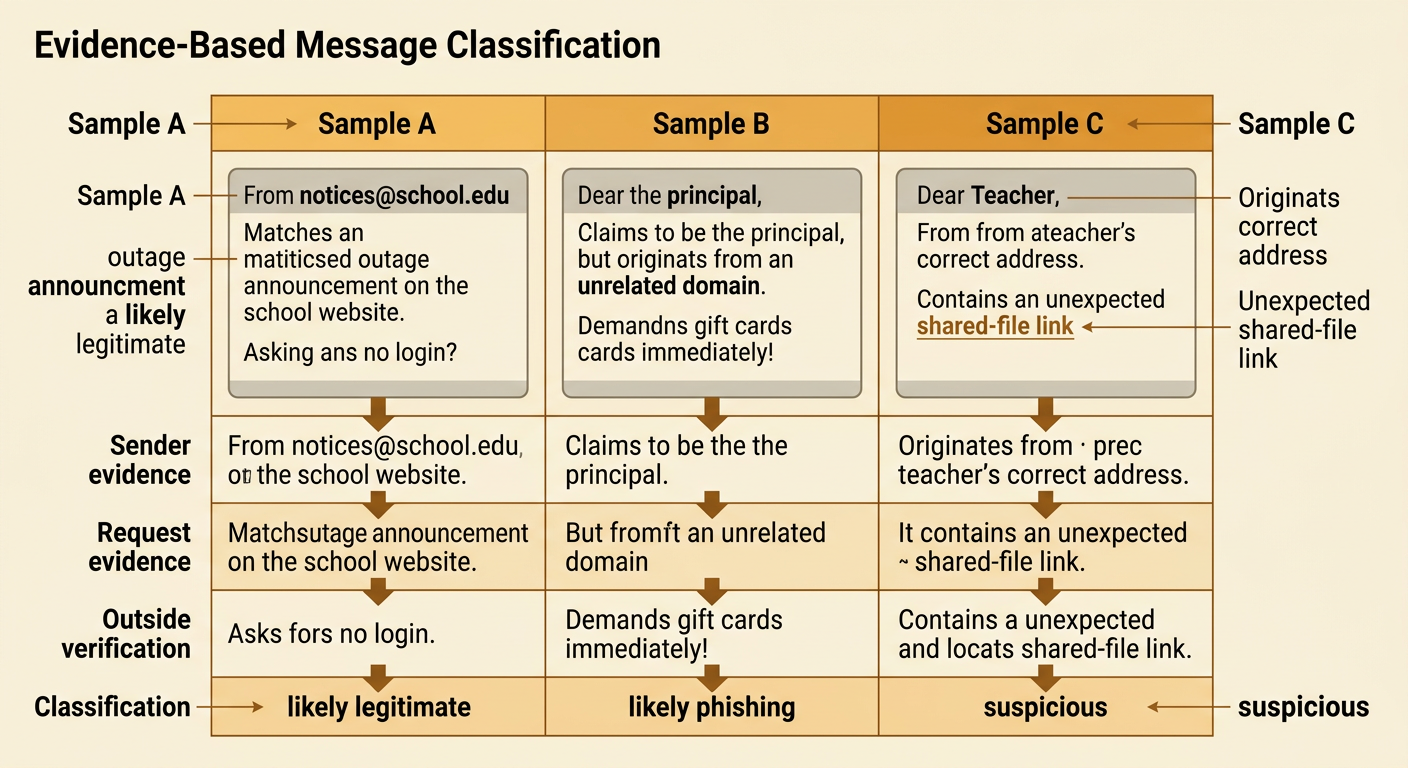
Classify messages as likely legitimate, suspicious, or likely phishing, and support each decision with evidence. Sample A comes from notices@school.edu, announces a planned outage also listed on the school website, and asks for no login. It is likely legitimate, although the sender and announcement should still be verified. Sample B claims to be the principal but comes from principal.office@example.com and asks the student to buy gift cards immediately. The unrelated domain, unusual payment request, and urgency make it likely phishing. Sample C comes from a teacher’s correct address but includes an unexpected shared-file link. It is suspicious rather than automatically safe because an account can be compromised. Students should explain both supporting and conflicting evidence. This classification process evaluates source credibility by comparing the message with trusted channels, normal behavior, and technical details.
Evaluating a Detection Checklist
A detection checklist is a practical solution, but it should be evaluated using prioritized criteria. The most important criteria are preventing harmful clicks, producing accurate decisions, and giving safe next steps. Speed and ease of use matter, but they should not replace careful inspection. Test the checklist against a varied set of known legitimate and phishing messages. Record false positives, which are safe messages incorrectly flagged, and false negatives, which are phishing messages incorrectly accepted. For example, a rule stating “Any spelling error means phishing” is quick but unreliable because legitimate writers make mistakes and many attacks use correct grammar. A stronger checklist prioritizes sender domains, link destinations, sensitive requests, context, and independent verification. Compare its advice with guidance from cybersecurity agencies, school technology staff, or trained security experts, and note that expert credibility depends on relevant knowledge and current evidence.

Safe Response Steps
If a message may be phishing, pause and avoid selecting links, opening attachments, replying, or forwarding it to classmates. Verify the request through a separate trusted channel, such as typing the organization’s known website, using an official app, or calling a published phone number. Report the message with the school or email provider’s reporting tool, then follow local instructions for deletion. For example, if a supposed counselor sends a link requesting a Social Security number, contact the counseling office using the number on the official school website. If you already selected a link, close the page and report what happened. If you entered a password, change it from the real site, enable multifactor authentication, and tell a trusted adult or technology administrator immediately. Preserve useful evidence, such as the message, sender address, time, and visible URL, without downloading dangerous files.
