
Evaluating App Permissions and Data Privacy
Students examine a fictional app’s permission requests, identify the data each permission exposes, and redesign the requests using the principle of data minimization.

Illustrations are auto-generated and may be placeholders. They can be refreshed to match the narration.
What App Permissions Reveal
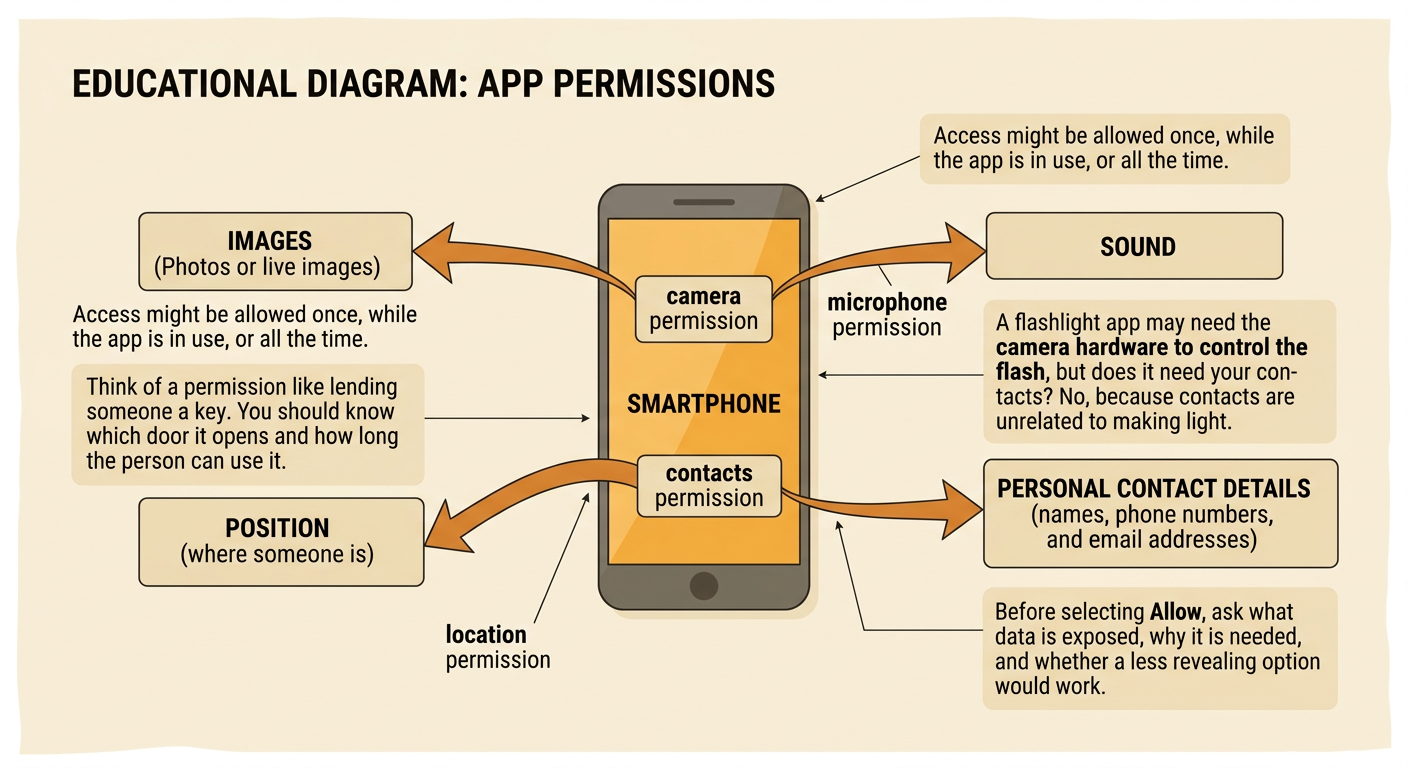
App permissions allow software to use parts of a device or access certain information. A camera permission may expose photos or live images. A microphone permission may capture sound. Location permission can reveal where a person is, while contacts permission can expose names, phone numbers, and email addresses. The effect depends on whether access is allowed once, only while the app is in use, or all the time. Permissions matter because collected data may be stored, analyzed, or shared. For example, a flashlight app needs access to the camera hardware to control the flash on some devices, but it usually does not need contacts or precise location. Before granting access, ask what data the permission exposes, why the app needs it, and whether a less revealing option would work.
Reading a Fictional Permission Notice
Consider a fictional homework app called StudySnap. Its notice says, “StudySnap requests camera access to scan worksheets, precise location to recommend nearby study groups, contacts access to invite classmates, and microphone access to record spoken notes. Data may be shared with service partners.” Read the notice closely and separate explicit statements from reasonable inferences. The text explicitly says that camera access is used to scan worksheets. A reasonable inference is that scanned worksheets could contain a student’s name or school information. The phrase “service partners” is unclear because it does not identify the companies or the exact data shared. Evidence from the notice supports questions such as: Is precise location necessary? Can invitations be sent without uploading all contacts? Careful readers cite several exact details before deciding whether a request is appropriate.

Matching Permissions to App Functions
A permission should connect clearly to a function that the user chooses. To evaluate StudySnap, make a function-permission table. Scanning a worksheet has a direct connection to camera access. Recording a spoken note has a direct connection to microphone access, but only when the student selects Record. Finding nearby study groups may use location, yet the app could ask for a ZIP code instead of precise GPS data. Inviting one classmate does not require permanent access to the entire contacts list; the user could type an email address or select one person through a system sharing tool. Use consistent criteria for every match: necessity, amount of data exposed, timing, and user control. A request is weak when its function is vague, unrelated, or possible through a less invasive method.

Applying Data Minimization
Data minimization means collecting only the data needed for a specific purpose, using it only when needed, and keeping it no longer than necessary. It does not mean collecting everything that might someday be useful. Apply three questions: What is the smallest amount of data needed? When should access occur? How long should the data remain stored? For StudySnap, scanning can use camera access only while the scanning screen is open. Nearby recommendations could use a user-entered ZIP code rather than continuous precise location. A spoken note could remain on the device unless the student chooses to upload it. A completed worksheet image could be deleted after text is extracted. These choices still support app functions while reducing exposure. Important constraints include device capabilities, safety, accessibility, and the app’s stated educational purpose.

Redesigning Permission Requests
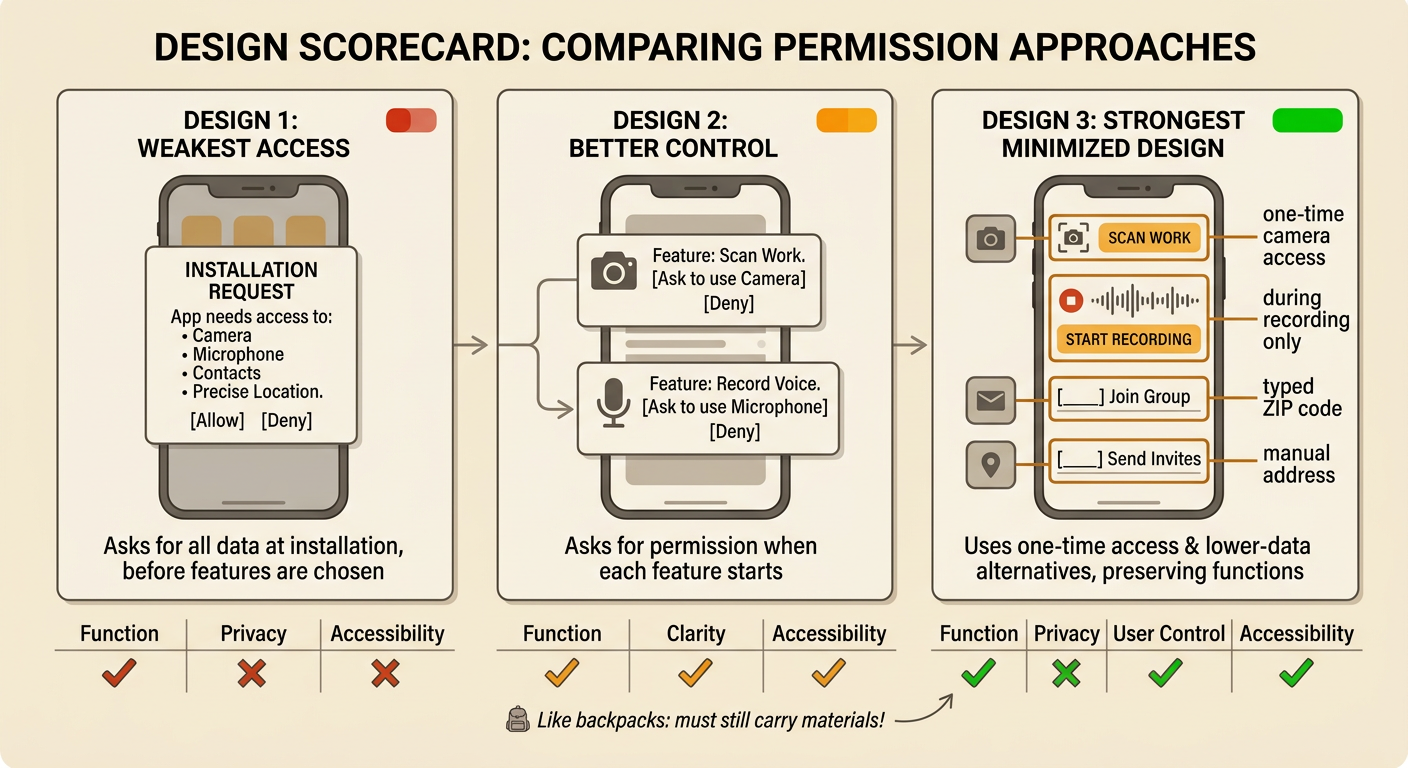
Redesign StudySnap by comparing possible solutions against shared criteria and constraints. One design requests camera, microphone, contacts, and precise location during installation. Another design asks for each permission only when the student starts the related feature. A stronger minimized design uses one-time camera access for scanning, microphone access only during recording, a typed ZIP code for nearby groups, and a manually entered address for invitations. Evaluate each design with a scorecard for function, privacy, clarity, user control, and accessibility. The app must still scan work and support students who use voice tools, so removing all camera and microphone access would not meet the functional and accessibility constraints. Clear requests should name the purpose, timing, and choice. For example: “Allow camera access this time to scan this worksheet?”
Explaining and Defending Choices
A strong recommendation states a claim, cites several pieces of evidence, and explains how the evidence supports the choice. For example: “StudySnap should replace precise location with an optional ZIP code.” Evidence one is that the notice uses location only to recommend nearby study groups. Evidence two is that precise location reveals more detail than a ZIP code. Evidence three is that students can still use scanning and spoken-note features without location access. The explanation should also address different perspectives. Students may value privacy and safety, while developers may value convenient features. Families and schools may expect transparency, fairness, and meaningful consent. These civic interests matter because privacy decisions affect participation in digital school communities. A thoughtful defense acknowledges trade-offs, applies the same evaluation criteria to competing designs, and proposes a solution that respects individual choice.
