
How Data Travels Across a Network
Students model how information is divided into packets, routed across a network, and reassembled at its destination while comparing possible routes.
Illustrations are auto-generated and may be placeholders. They can be refreshed to match the narration.
Network Nodes and Connections
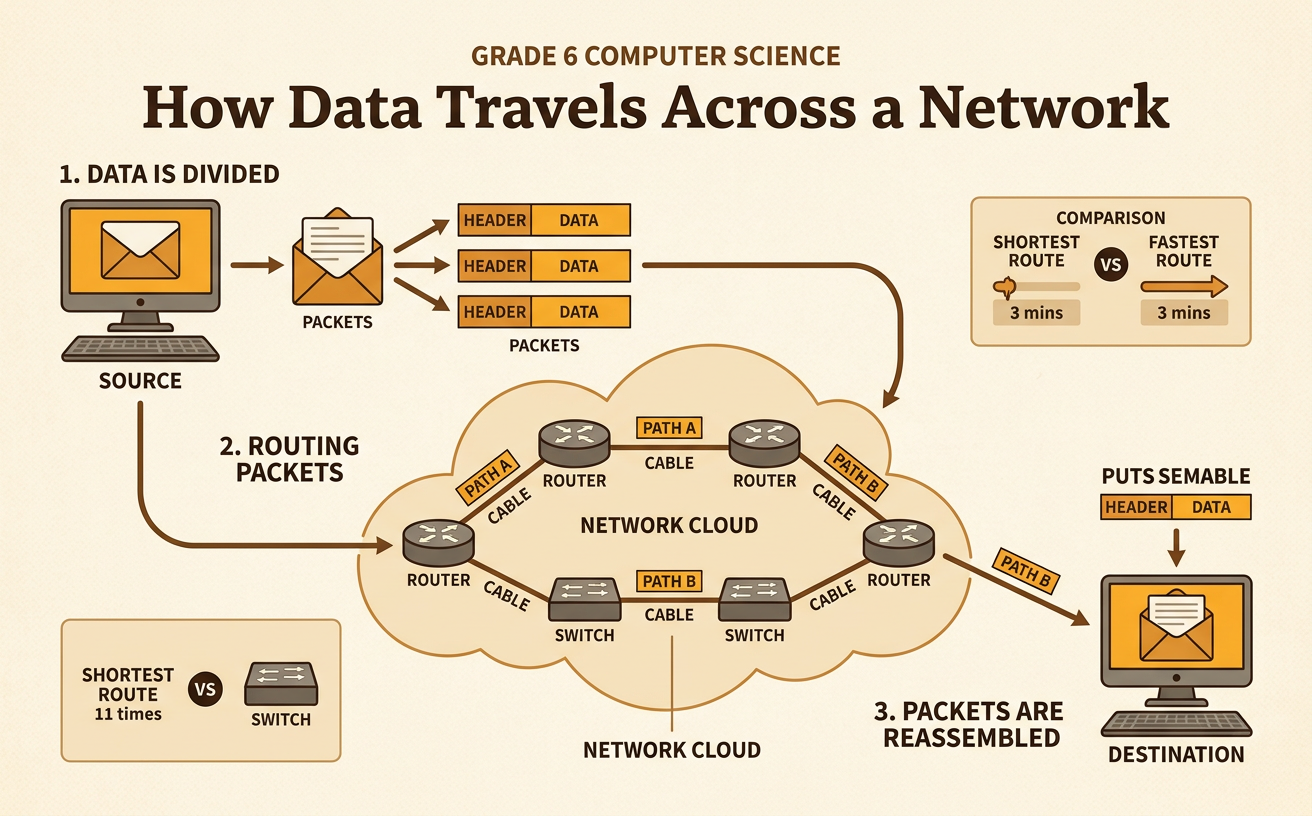
A network is a group of connected devices that can exchange data. Each device or connection point is called a node. Computers, phones, printers, switches, and routers can all be nodes. Connections between nodes may use cables, fiber-optic lines, or wireless signals. A router is a special node that directs data toward its destination. Imagine sending a photo from a school tablet to a classroom printer. The tablet sends data through a wireless access point. A switch connects devices inside the school, and a router directs the data to the correct part of the network. To model this process, draw nodes as circles and connections as lines. Then trace the possible paths between the tablet and printer. A connection shows where data can travel, but it does not mean that data always takes that path.

Breaking a Message into Packets
Networks usually divide a large message into smaller units called packets before sending it. Each packet carries part of the data plus control information, such as the destination address, source address, and sequence number. The sequence number tells where that packet belongs in the complete message. Suppose Mia sends the sentence “MEET AT NOON.” A simplified model might divide it into three packets: “MEET,” “ AT,” and “ NOON.” The packets could be numbered 1, 2, and 3. Smaller packets are easier for a network to manage because many users can share the same connections. If one packet is lost, the system may request or send that missing packet again instead of repeating the entire message. Real packet sizes and contents follow specific communication rules called protocols.

Choosing Routes
Packets can travel along different routes from a source to a destination. Routers examine a packet’s destination information and use routing rules to choose a next step, called the next hop. A router may consider available connections, path length, traffic, and whether a connection is working. It does not usually plan the entire trip the way a person plans a road trip. Instead, each router forwards the packet one step closer to its destination. For example, a packet traveling from School A to a library server might use the shortest three-link route. If one connection fails, routers may direct later packets through a four-link route instead. In a classroom model, place cards for routers on a map. Send numbered packet cards from node to node, recording every hop so the chosen routes can be compared.

Reassembling the Message
Packets do not always arrive in the order in which they were sent. One packet may take a short route while another takes a longer route. At the destination, the receiving device uses sequence numbers and communication protocols to put the data in the correct order. It can also check whether the packets arrived without certain kinds of errors. Imagine that packets containing parts of “MEET AT NOON” arrive in the order 2, 1, 3. The receiver does not display “ ATMEET NOON.” Instead, it places packet 1 first, packet 2 second, and packet 3 third. If packet 2 is missing, a reliable transport process can detect the gap and arrange for it to be sent again. After all required packets arrive correctly, the device reassembles and presents the complete message.

Comparing Speed and Reliability
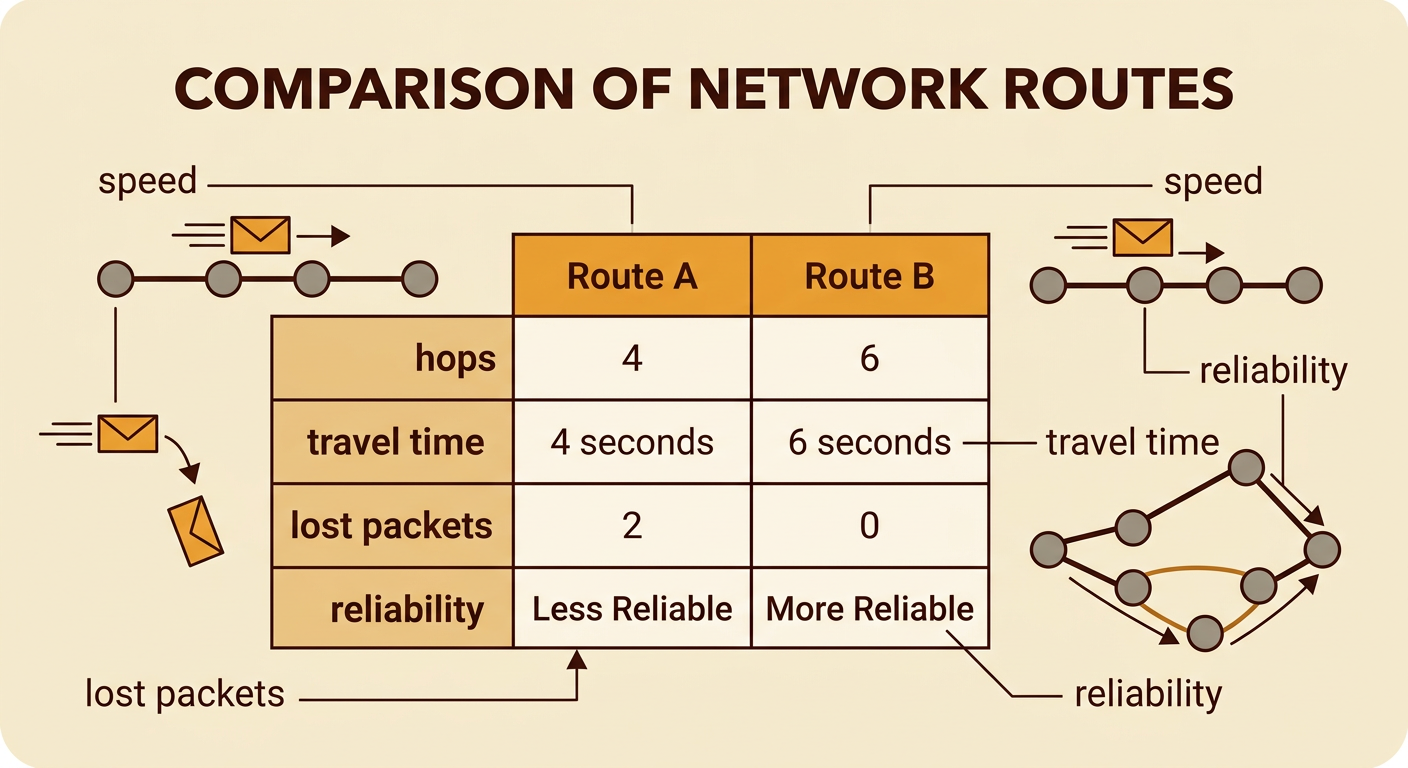
A good network route should be evaluated using clear criteria rather than a single guess. Speed describes how quickly data reaches its destination, while reliability describes how consistently data arrives correctly. Students can compare routes by sending the same number of packet cards along each one. For Route A, record the number of hops, total travel time, and lost packets. Repeat the test several times. Then test Route B under the same conditions. Route A might average four seconds but lose two packets when one link becomes crowded. Route B might average six seconds and lose none. If a live video call needs very low delay, Route A may be preferred when it is working well. If an important assignment must arrive completely, Route B may be better. A systematic comparison uses the same procedure, measurements, and scoring rules for every design.
Network Rules and Responsible Use
Networks depend on technical rules, school policies, and laws. Technical protocols help devices format, address, send, and receive data in compatible ways. School acceptable-use policies may require students to protect passwords, visit approved sites, and avoid changing network settings. Laws can prohibit unauthorized access, theft of private information, and damage to computer systems. These rules affect both people and institutions. Students are responsible for using shared resources safely, while schools must protect records, manage access, and respond to security problems. For example, a student who receives an unexpected link should not enter a password. The student should close the message and report it to a teacher or technology staff member. Responsible choices reduce risks for everyone because one stolen account could be used to reach files or disrupt services across the network.
