
Programming a Grade 7 Equation Solver
Students use variables, arithmetic operations, user input, and conditional statements to design pseudocode that solves and checks real-world equations or inequalities.
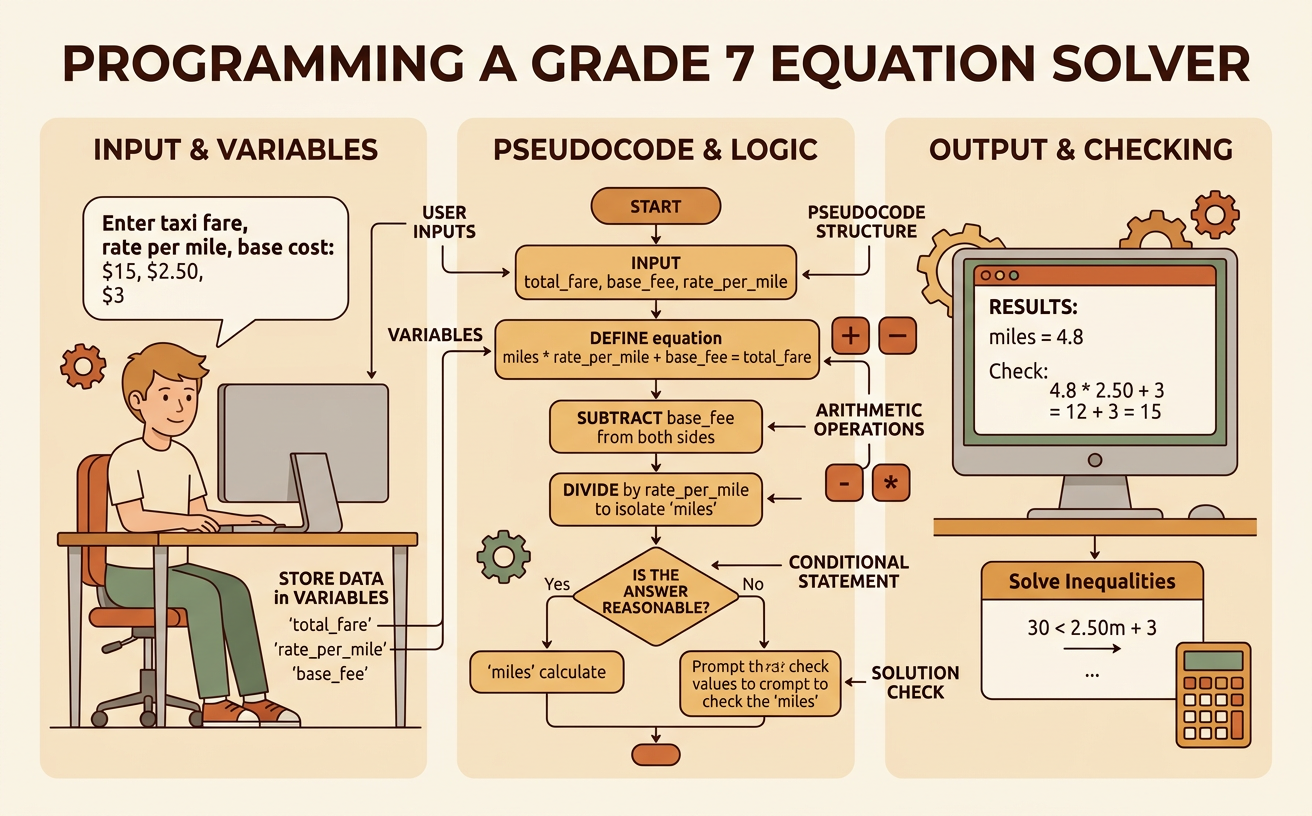
Illustrations are auto-generated and may be placeholders. They can be refreshed to match the narration.
Connect Equations to Programs
An equation solver program follows the same reasoning you use to solve an equation by hand. First, represent an unknown quantity with a variable. Then perform operations that isolate the variable while keeping the equation balanced. For example, suppose a bike rental costs a $6 starting fee plus $4 per hour, and the total bill is $30. If h represents the number of hours, the equation is 6 + 4h = 30. A program can subtract 6 from the total and then divide by 4: h = (30 − 6) ÷ 4. The result is h = 6. Programming turns this mathematical reasoning into an ordered set of instructions. Each instruction must be precise so that the computer uses the correct values and operations.
Identify Inputs and Variables
Inputs are values supplied to a program, while variables are names that store quantities. Choose variable names that clearly describe what each value represents. In the bike rental example, the program needs three inputs: startingFee, hourlyRate, and totalCost. It must find a fourth quantity, hours. The values might be startingFee = 6, hourlyRate = 4, and totalCost = 30. The variable hours is initially unknown. In pseudocode, you could write INPUT startingFee, INPUT hourlyRate, and INPUT totalCost. You should also identify reasonable restrictions. A fee, rate, total, or number of hours should not be negative in this situation. The hourly rate must also be greater than zero because the program will divide by it. Defining inputs and variables carefully prevents confusion and prepares the program to solve many similar problems.

Write the Calculation Steps
Pseudocode describes program instructions in a form that people can read easily. Arrange the calculation steps in the same order used to isolate the variable. For the equation startingFee + hourlyRate × hours = totalCost, first subtract the starting fee from the total cost. Store that amount in a variable called remainingCost. Next, divide remainingCost by hourlyRate to find hours. The pseudocode can say SET remainingCost = totalCost − startingFee, followed by SET hours = remainingCost ÷ hourlyRate. With the sample inputs, remainingCost = 30 − 6 = 24, and hours = 24 ÷ 4 = 6. Parentheses can make the order especially clear: hours = (totalCost − startingFee) ÷ hourlyRate. If the program divided before subtracting, it would produce the wrong answer, so operation order matters.

Add a Conditional Check
A conditional statement tells a program to choose an action based on whether a condition is true or false. Before dividing, the solver should check whether hourlyRate is greater than zero. It can use the instruction IF hourlyRate > 0, THEN calculate hours; ELSE display an error message. The program can also decide whether the answer fits the situation. For example, if rentals are available only in whole hours, the program should check whether hours is a whole number. With a $6 fee, a $4 hourly rate, and a $29 total, the calculation gives hours = 5.75. The condition “hours is a whole number” is false, so the program reports that the total does not represent a whole-hour rental. Conditions allow the solver to handle invalid input or results instead of always displaying a misleading answer.
Test and Debug the Program
Testing means running a program with several sets of inputs and comparing each output with the expected mathematical result. Debugging means finding and correcting mistakes. Begin with the known case startingFee = 6, hourlyRate = 4, and totalCost = 30. The expected output is 6 hours. Then test a boundary or unusual case, such as hourlyRate = 0, which should produce an error instead of division by zero. Also test totalCost = 5, which is less than the starting fee and would produce a negative number of hours. If the program reports −0.25 hour, add a condition requiring totalCost to be at least startingFee. Common bugs include reversing subtraction, dividing by the wrong variable, and using the wrong comparison symbol. A test table makes mismatches easy to see and helps confirm that each correction works.
Explain the Mathematical Output
A program’s output should be interpreted in the context of the original problem, not reported as a number without meaning. If the solver outputs hours = 6, explain that the bicycle was rented for 6 hours. Then check the answer by substituting it into the original equation: 6 + 4(6) = 30. Because 6 + 24 = 30, the output makes the equation true. For an inequality, the output may be a range rather than one value. Suppose a rider can spend at most $30. The inequality is 6 + 4h ≤ 30. Solving gives h ≤ 6, so the rider can rent the bike for no more than 6 hours. If only whole, nonnegative hours are allowed, the possible values are 0, 1, 2, 3, 4, 5, and 6. A complete explanation includes units, restrictions, and a mathematical check.