Representing Images with Binary Pixels
Students encode and decode a small black-and-white pixel image using binary values and explain how resolution affects digital storage.

Illustrations are auto-generated and may be placeholders. They can be refreshed to match the narration.
Pixels and Digital Images
A digital image is a rectangular grid of tiny picture elements called pixels. Each pixel stores a value that tells a screen what color or shade to display at that location. When viewed from far enough away, the separate pixels blend into a complete picture. Image resolution describes the grid’s dimensions and total number of pixels. For example, a 4-by-3 image has four pixels across and three pixels down, for a total of 12 pixels. If several pixels in the upper-left corner are black while the others are white, the image may look like a small block or simple symbol. Increasing the number of pixels can represent finer edges and smaller details, but it also creates more values for a computer to store and transmit.

Encoding Black and White with Bits
A bit is the smallest unit of digital information and can have one of two values: 0 or 1. Because a black-and-white image has only two possible colors, one bit can encode each pixel. A computer may use the rule 0 means white and 1 means black, although the opposite rule would also work if it were clearly defined. For example, the rows 0110, 1001, 1111, and 1001 form a 4-by-4 pattern resembling a capital A when every 1 is colored black. The image requires 16 pixel bits because it contains 16 pixels. The encoder and decoder must use the same color rule, grid dimensions, and row order. Without that shared information, the same bit sequence could be interpreted incorrectly.

Decode a Binary Pixel Grid
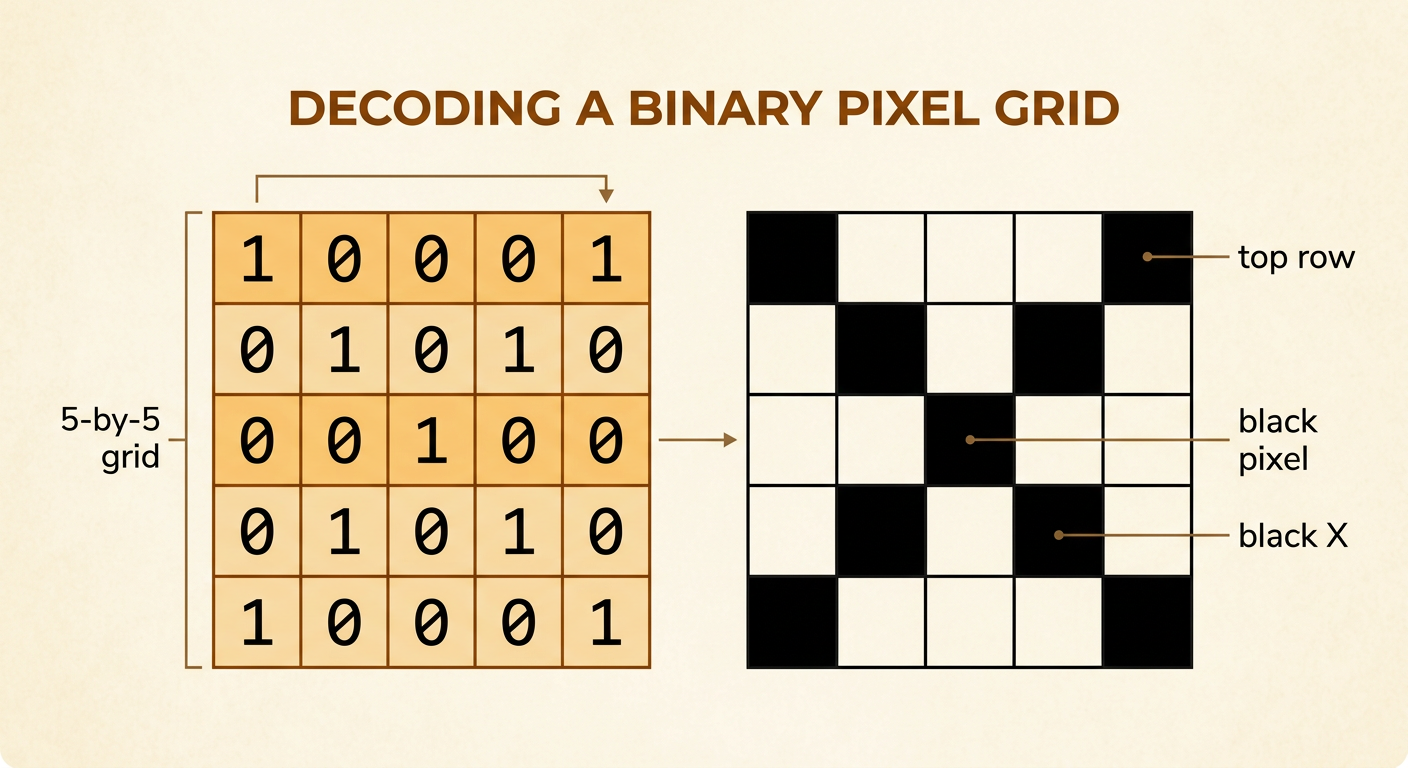
To decode a binary pixel grid, first identify the image width, height, and color rule. Then read the bits in order, usually from left to right across each row and from the top row to the bottom row. Consider this 5-by-5 grid: 10001, 01010, 00100, 01010, and 10001. Using 1 for black and 0 for white produces a black X on a white background. The first row places black pixels at both ends, the middle row places one black pixel in the center, and the pattern then repeats in reverse. Counting each row before moving to the next helps prevent misplaced pixels. Decoding is reliable because each bit has a defined position and meaning, allowing an exact copy of the original grid to be reconstructed.
Calculate Storage Requirements
For an uncompressed black-and-white image, calculate ideal pixel storage by multiplying width by height by one bit per pixel. An 8-by-8 image contains 8 × 8 = 64 pixels, so it needs 64 bits. Because 8 bits equal 1 byte, 64 bits ÷ 8 = 8 bytes. A 100-by-100 image contains 10,000 pixels and requires 10,000 bits, or 1,250 bytes, when the bits are packed efficiently. These calculations describe only the pixel data. An actual image file may also store its dimensions, file type, color rule, and other metadata, so its total size may be larger. Compression can sometimes reduce file size by describing repeated patterns more efficiently, but the basic uncompressed calculation provides a useful comparison between image resolutions.

Resolution and Storage Trade-Offs
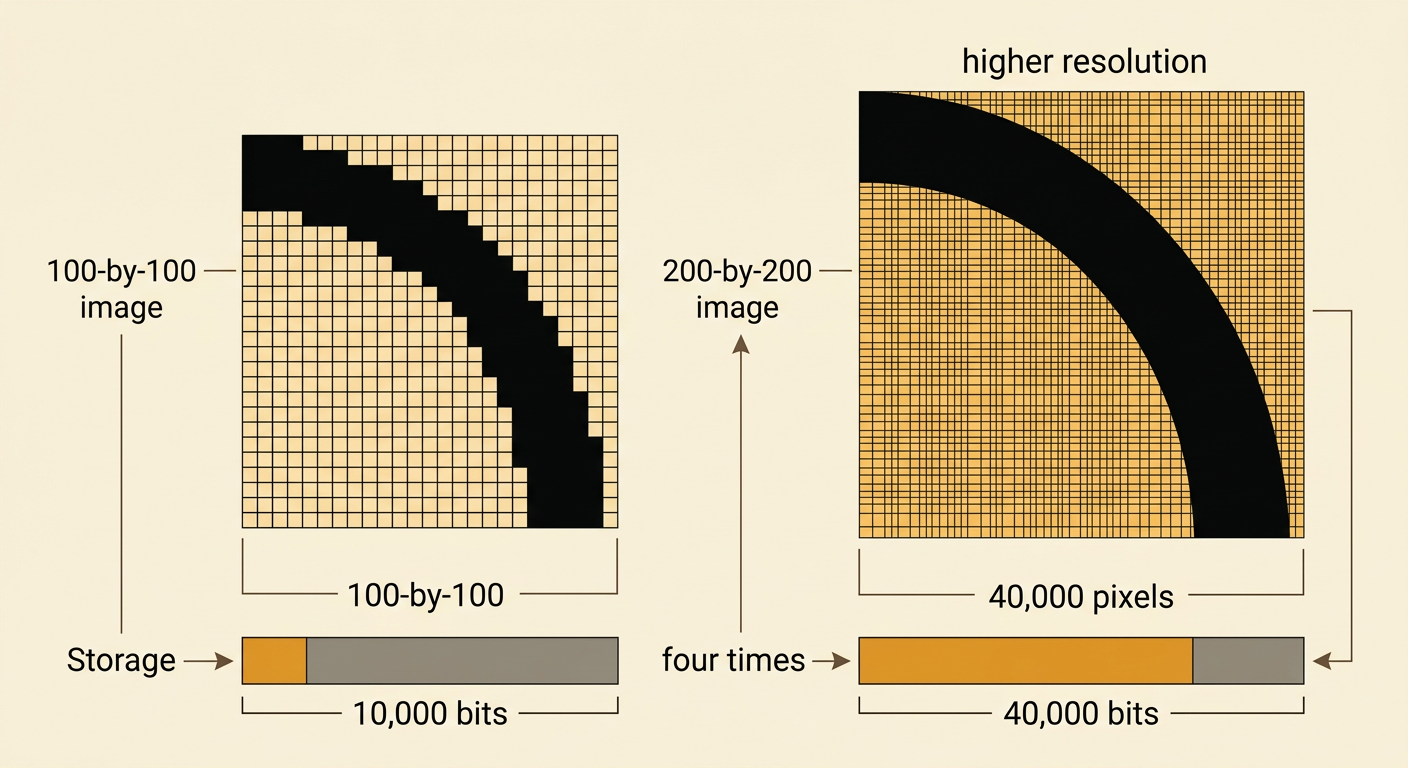
Higher resolution can improve image detail, but it increases storage and transmission needs. A 100-by-100 black-and-white image contains 10,000 pixels and uses 10,000 uncompressed pixel bits. Doubling both dimensions to 200 by 200 creates 40,000 pixels, not 20,000, because both width and height increase. The higher-resolution image therefore requires four times as much pixel storage and may take longer to transmit over the same connection. Its advantage is that curved edges and small features can appear smoother and clearer. Its disadvantages include larger files, greater storage use, and more transmission time. Digital storage still allows the bit pattern to be copied exactly, and error-checking methods can detect transmission mistakes. Choosing a resolution requires balancing useful detail against file size, speed, and available storage.