
Tracing Data Across the Internet
Students model how a digital message is divided into packets, routed through a network, and reassembled at its destination.
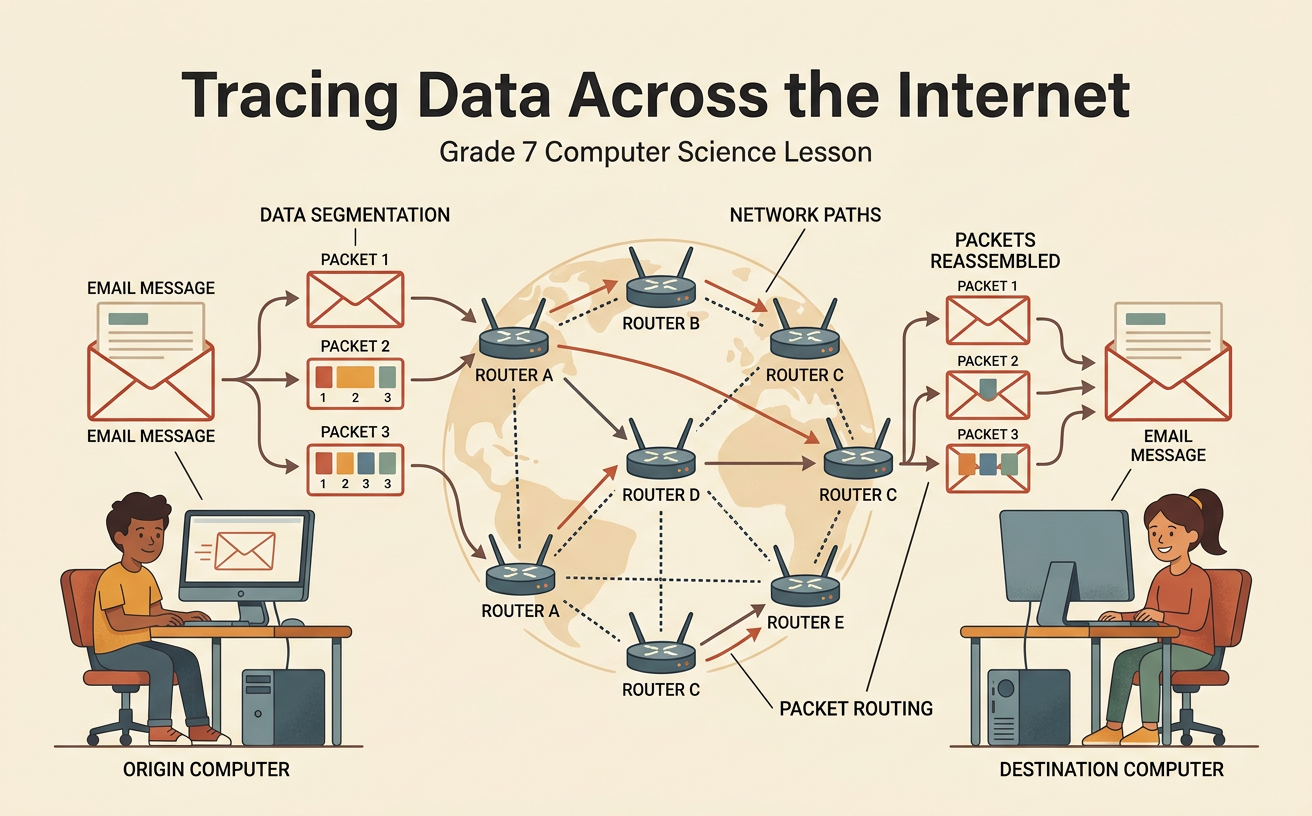
Illustrations are auto-generated and may be placeholders. They can be refreshed to match the narration.
From Messages to Data Packets
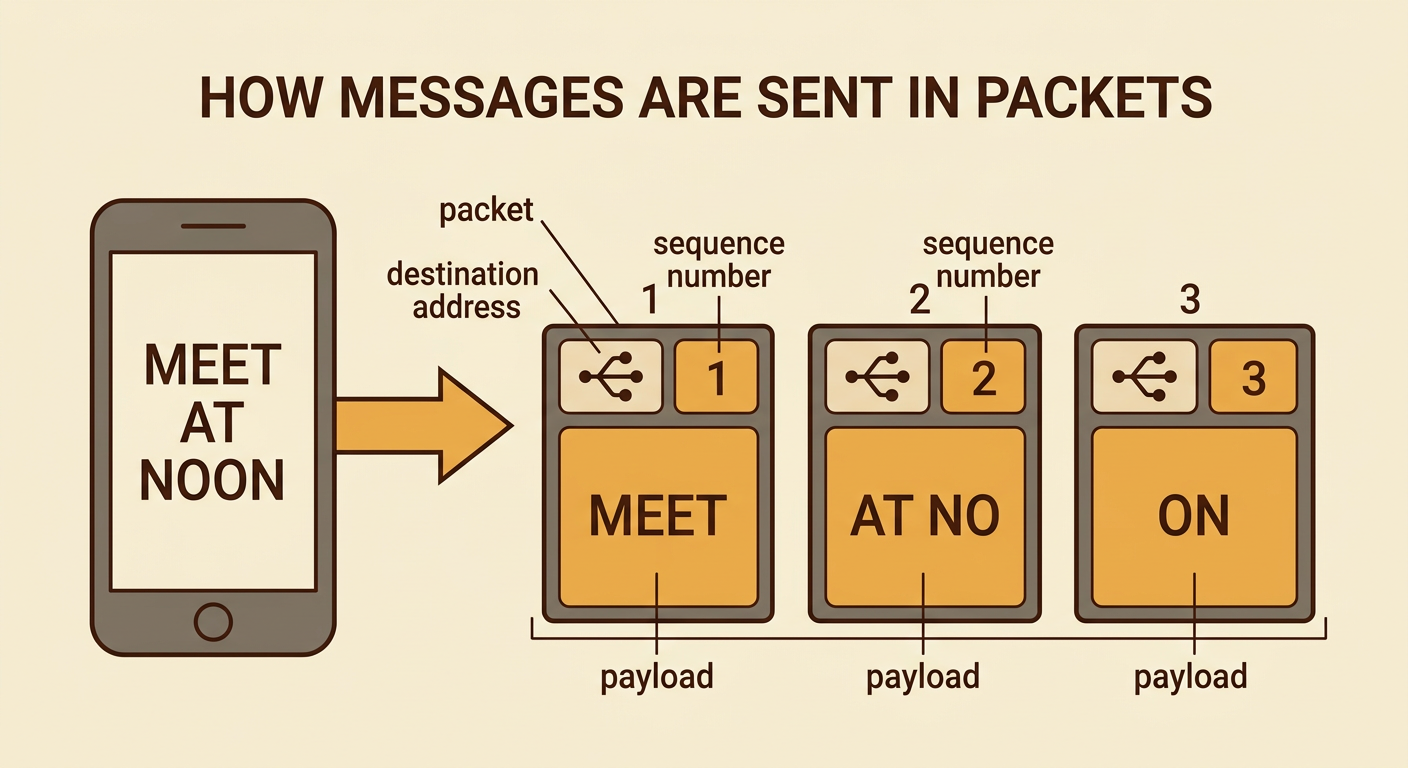
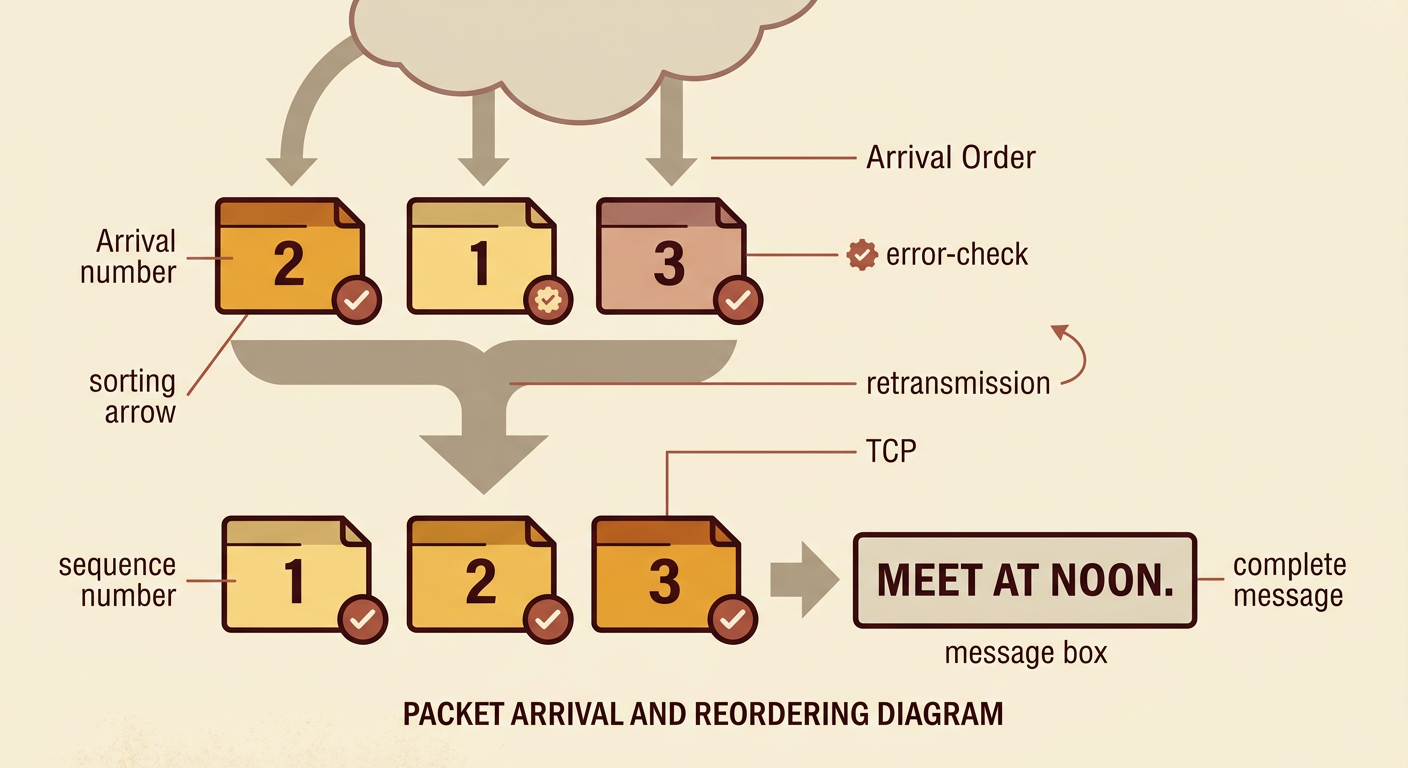
When you send a digital message, the device represents its text, image, sound, or video as binary data. Before traveling across the Internet, a long message is usually divided into smaller units called packets. Each packet carries part of the message as its payload. It also includes control information, such as source and destination addresses, a sequence number, and error-checking data. Imagine sending the message “MEET AT NOON” in three packets. Packet 1 might carry “MEET,” packet 2 “ AT,” and packet 3 “ NOON.” Dividing data allows many users’ packets to share the same network connections. It also means that if one packet is lost or damaged, a networking protocol may request that packet again instead of sending the entire message again.
Network Nodes and Connections
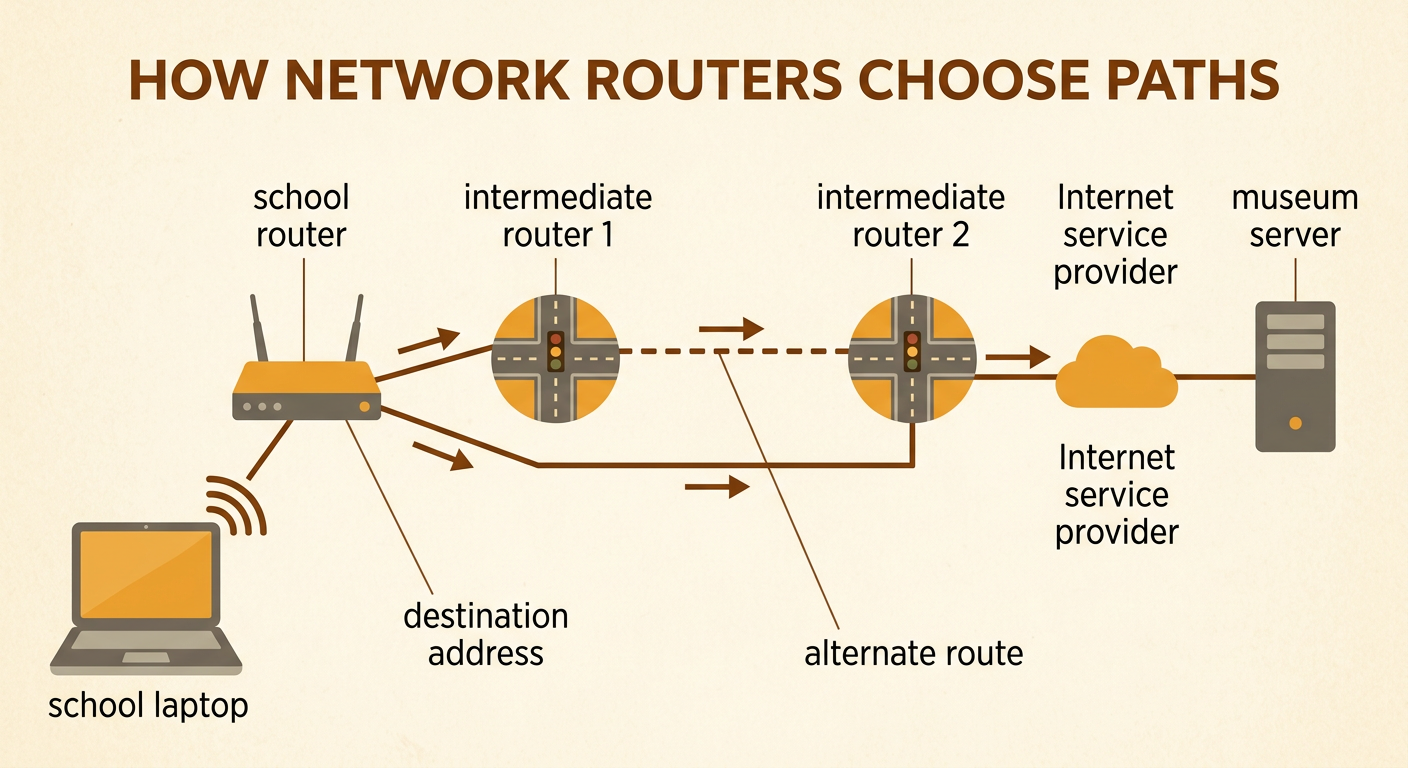
A network is made of nodes and connections. Nodes include computers, servers, switches, and routers. Connections may use copper cables, fiber-optic cables, or wireless signals. A router receives a packet, examines its destination address, and sends it toward an appropriate next node using routing information. The chosen route is not always the geographically shortest route because traffic, failed equipment, connection capacity, and network policies can affect the decision. For example, a packet traveling from a school laptop to a museum website might pass through the school router, an Internet service provider, and several other routers before reaching the museum’s server. Like roads connecting cities, network connections create multiple possible paths. Unlike a traveler, however, a packet can move between distant nodes in a fraction of a second.
Simulating Packet Routes
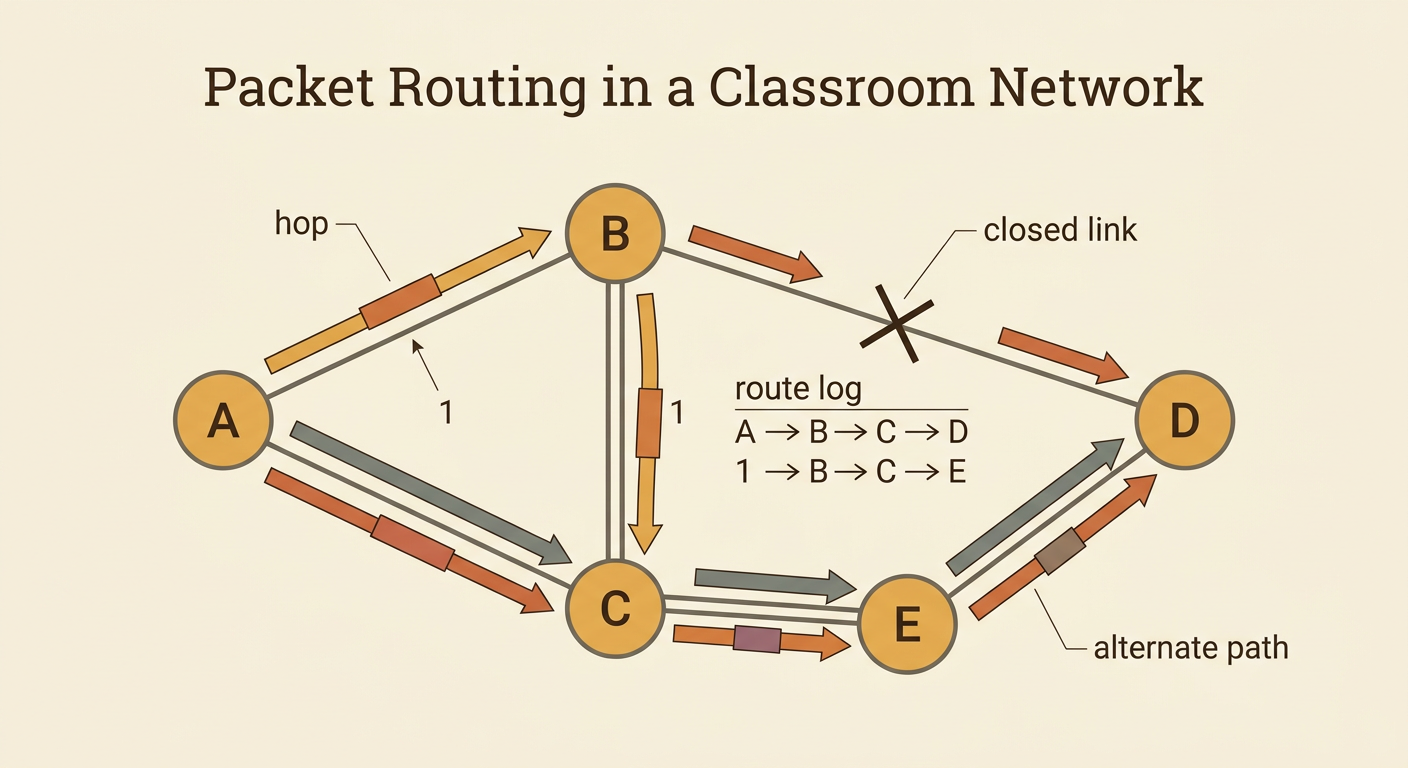
You can model packet routing with index cards and a classroom network map. Write part of a message on each card, add the same destination, and give every card a sequence number. Students acting as routers pass each card to a neighboring router until it reaches the destination. One packet might travel from A to B to D, while another moves from A to C to E to D. Record every hop in a route log. If a connection becomes unavailable, the routers must choose another path. For example, if the link between B and D closes, packet 1 might be redirected through C and E. Compare the number of hops and travel time for each route. The activity demonstrates that packets from one message can take different routes and may arrive in a different order from the order in which they were sent.
Reassembling the Message
Packets do not always arrive in sequence. A packet taking a shorter or less crowded route may reach the destination before a packet sent earlier. The receiving device uses sequence numbers and networking rules to place the packets in the correct order. Error-checking values can help identify data that changed during transmission. With a reliable transport protocol such as TCP, missing or damaged data can be sent again. Suppose three packets arrive in the order 2, 1, 3. The receiver reads their sequence numbers, arranges them as 1, 2, 3, and reconstructs “MEET AT NOON.” If packet 2 is missing, the complete message cannot yet be assembled, so TCP can trigger retransmission of the missing data. This process helps digitized information arrive accurately even when individual network paths are imperfect.
Calculating a Data Transfer Rate
A data transfer rate compares the amount of data transferred with the time required. To find the unit rate, divide the data amount by the number of seconds. Suppose a device downloads 600 kilobytes in 4 seconds. The rate is 600 kilobytes divided by 4 seconds, or 150 kilobytes per second. At that constant rate, a 900-kilobyte file would take 6 seconds because 900 divided by 150 equals 6. Rates may also be measured in bits per second, kilobits per second, or megabits per second. One byte equals eight bits, so units must be checked before rates are compared. Actual transfer rates may change because of network traffic, signal quality, distance, equipment, and packet overhead. A unit rate provides a useful average for comparing network performance.

Why Reliable Networks Matter
Digitized signals represent information with distinct values, usually bits labeled 0 and 1. A receiver can often recognize those values even when a signal picks up a small amount of noise. Error checking, retransmission, and alternate routes add further reliability, although no network can guarantee that every service will always be available. Reliable communication networks help people share ideas, attend online classes, receive emergency alerts, conduct business, and communicate across long distances. For example, a rural clinic with a dependable Internet connection can send medical images to a specialist in a city. Faster communication can influence where people live and work because some jobs and services can be accessed remotely. It also speeds the diffusion of music, news, language, inventions, and cultural practices. However, communities without affordable, reliable access may not receive these benefits equally.
