
Use a Loop to Animate a Community Cleanup
Students use a repeat loop to animate a character collecting litter and communicate how people can help care for their community and environment.

Illustrations are auto-generated and may be placeholders. They can be refreshed to match the narration.
Notice Repeated Actions
Imagine a character helping clean a neighborhood park. The character walks to a piece of litter, picks it up, and places it in a trash bag. Then the character does the same actions again for the next piece. When actions happen in the same order more than once, they form a pattern. Programmers look for repeated patterns because they can make code shorter and easier to understand. In this cleanup, the repeating actions are move, pick up, and place in the bag. A computer will follow each instruction exactly, so the order matters. Cleaning litter helps protect soil, water, plants, and animals. Anyone can help, including children, families, neighbors, and community leaders. As you study the actions, ask yourself: Which steps stay the same each time?

Explore the Repeat Loop
A repeat loop tells a computer to perform one or more instructions a set number of times. Instead of writing move, pick up, and place in bag three separate times, you can put those commands inside a loop that says repeat 3 times. The computer completes every command inside the loop, returns to the beginning of the loop, and runs them again. After the third round, it leaves the loop and follows the next command. The number in the loop controls how many times the actions happen. If there are four pieces of litter, the loop may need to repeat 4 times. A loop saves space and makes the repeated pattern easy to see. It also helps you change the program quickly because you can adjust one repeat number instead of rewriting many commands.

Plan a Cleanup Animation
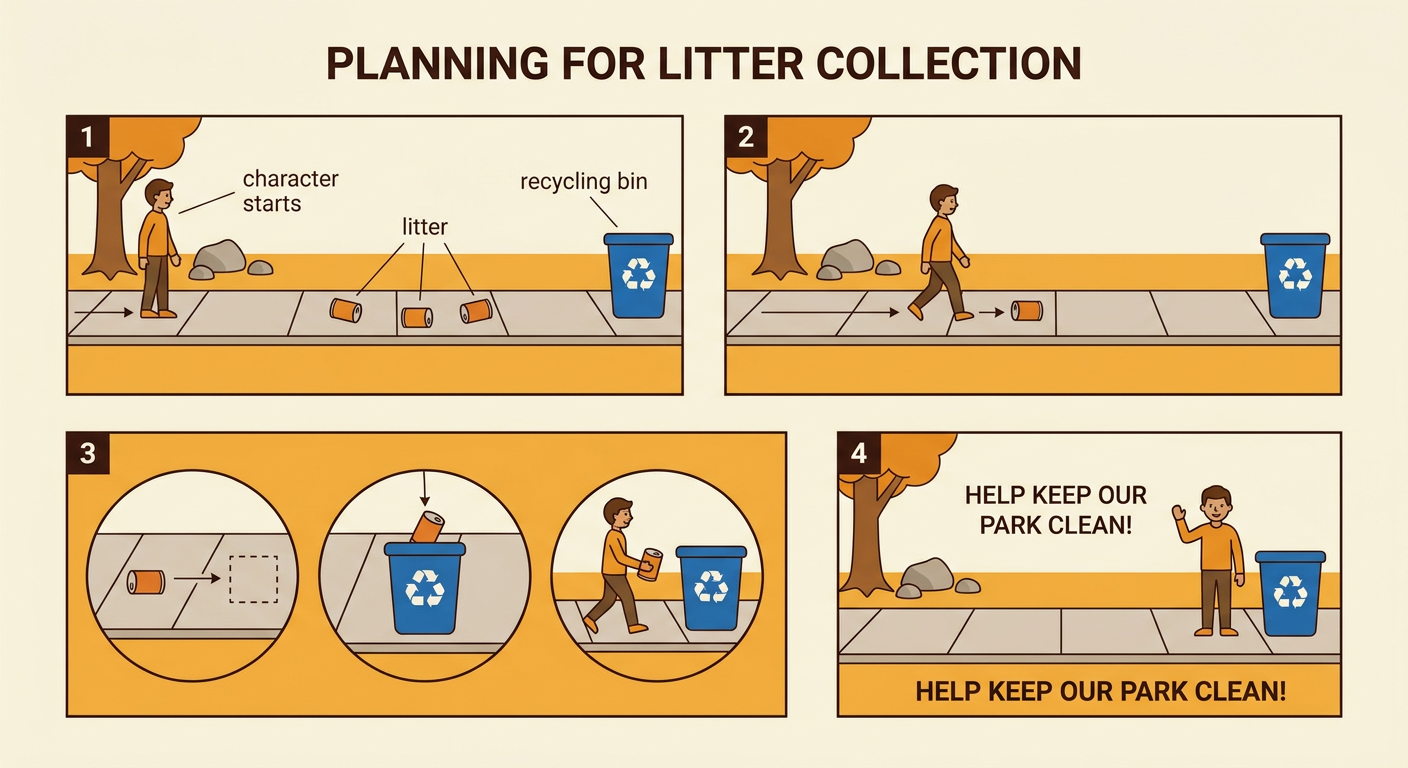
Before coding, make a simple plan for your animation. Choose a community place, such as a park, sidewalk, playground, or stream bank. Draw where the character starts, where the litter is located, and where the trash or recycling bin stands. Count the pieces that the character will collect. For example, your plan might show three cans placed along a sidewalk. Each time through the loop, the character moves to the next can, collects it, and carries it toward a recycling bin. Decide how the picture will change to show that the litter was collected. The can might disappear from the ground and appear in the bin. Add a final message such as, “Everyone can help care for our park.” Your plan should clearly show both the repeated action and the helpful community idea.
Code the Repeated Action
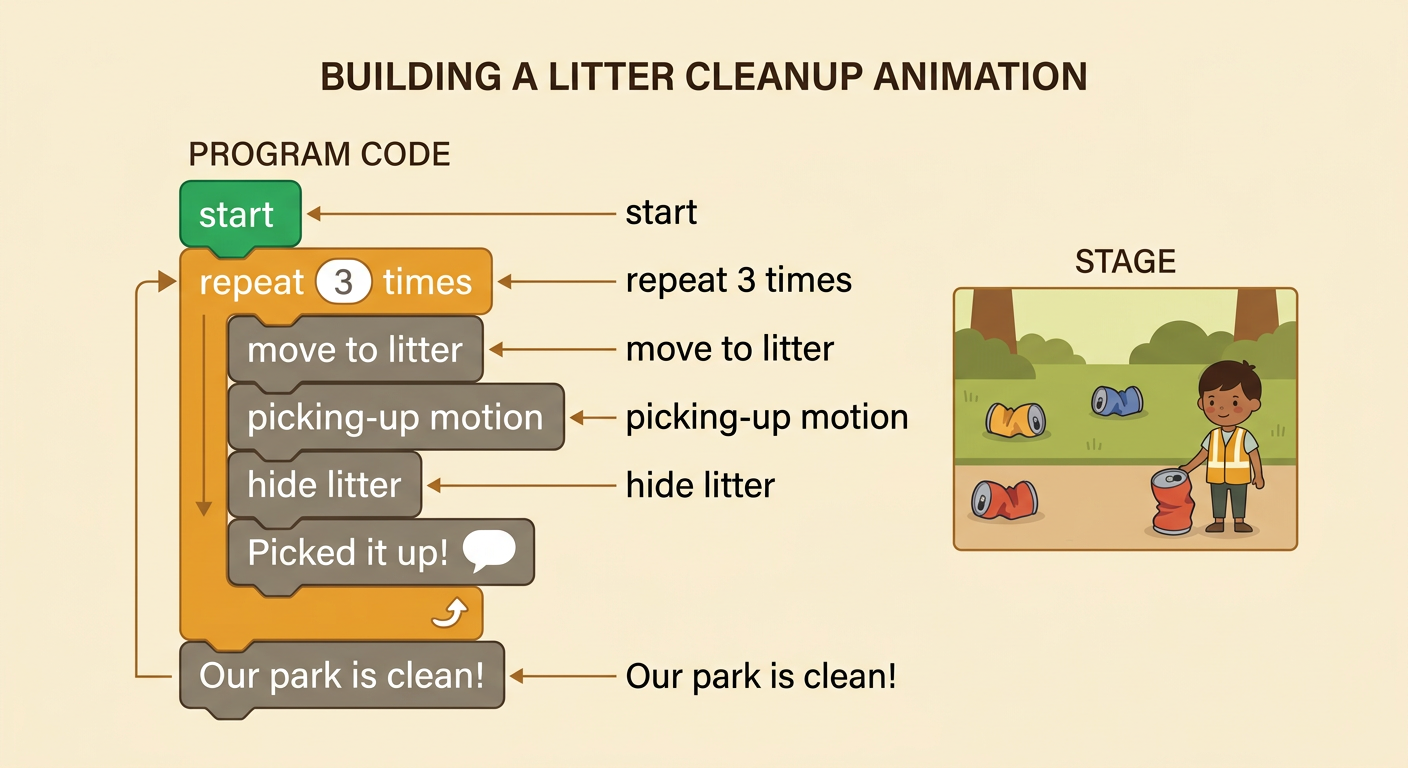
Build the animation by placing the repeated commands inside one loop. Begin with a start command. Then add a repeat 3 times block if your scene has three pieces of litter. Inside the loop, add commands that make the character move to the next piece, show a picking-up motion, and hide the litter. You might also add a short sound or a speech bubble that says, “Picked it up!” Keep commands that should happen only once outside the loop. For example, the message “Our park is clean!” belongs after the loop because it should appear when all three pieces are gone. Run the code and watch the order carefully. The character should collect one new piece during each turn through the loop. This code shows how one person’s repeated helpful actions can improve a shared community space.
Test, Revise, and Share
Testing means running your animation and checking whether it works as planned. Watch one full run and count each time the loop repeats. Does the character reach every piece of litter? Does each piece disappear only after it is collected? Does the final message wait until the cleanup is complete? If something is wrong, revise one part and test again. For example, if one bottle remains after a repeat 3 times loop, there may be four bottles, so change the repeat number to 4. If the final message appears four times, move it outside the loop. When the animation works, share it with a partner. Explain what repeats and how the visual scene supports your message. Ask your partner whether the animation clearly shows that children, neighbors, and leaders can all help reduce litter and care for land, water, plants, and animals.
