
Writing Conditional Logic with Boolean Expressions
Students translate an online-store discount policy into Boolean expressions and if/else pseudocode, then test boundary cases and evaluate the rule’s tradeoffs.

Illustrations are auto-generated and may be placeholders. They can be refreshed to match the narration.
Identify Inputs and Expected Outputs
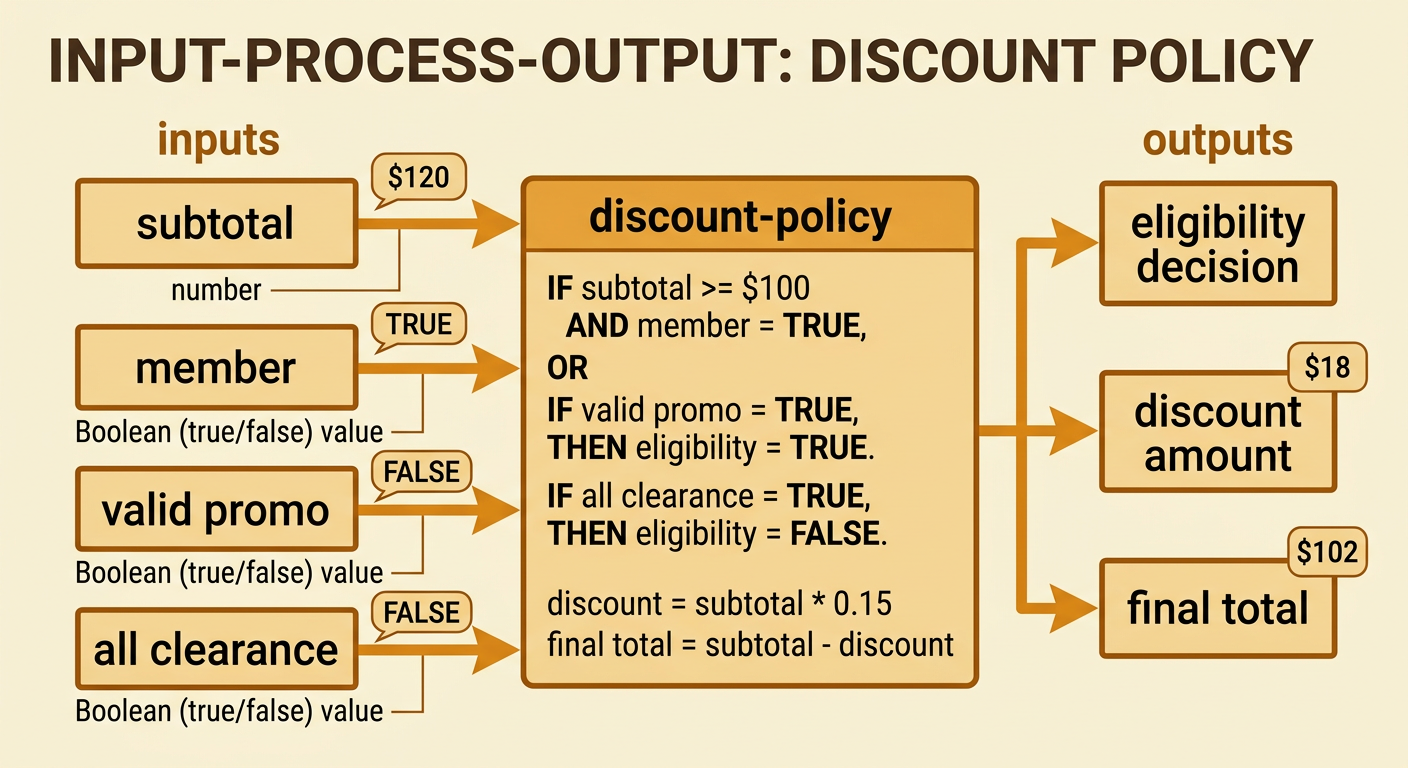
Begin by separating information the program receives from results it must produce. Consider this store policy: A customer receives 15% off when the merchandise subtotal is at least $100 and the customer is a loyalty member, or when the customer has a valid promo code. Orders containing only clearance items are not eligible. The inputs are the merchandise subtotal, loyalty membership status, promo-code validity, and whether all items are clearance. The subtotal is a number; the other inputs are Boolean values, meaning true or false. Expected outputs include whether the customer qualifies, the discount amount, and the final total. For example, a member with a $120 subtotal, no promo code, and an order that is not all clearance qualifies. The discount is $18, so the final total is $102 before taxes or shipping.
Use Comparison and Boolean Operators
Comparison operators turn values into true-or-false expressions. The expression subtotal >= 100 asks whether the subtotal is greater than or equal to $100. If subtotal is $120, the expression is true; if it is $99.99, the expression is false. Other comparison operators include >, <, <=, ==, and !=. Use == to test equality rather than assign a value. Variables such as member, validPromo, and allClearance already store Boolean values. For a non-clearance requirement, the expression allClearance == false is true when the order includes at least one regular-price item. Comparisons can also describe an unknown threshold. If a 15% discount must be at least $18, solve 0.15s >= 18. Dividing both sides by 0.15 gives s >= 120, so the subtotal must be at least $120.

Combine Conditions with AND, OR, and NOT
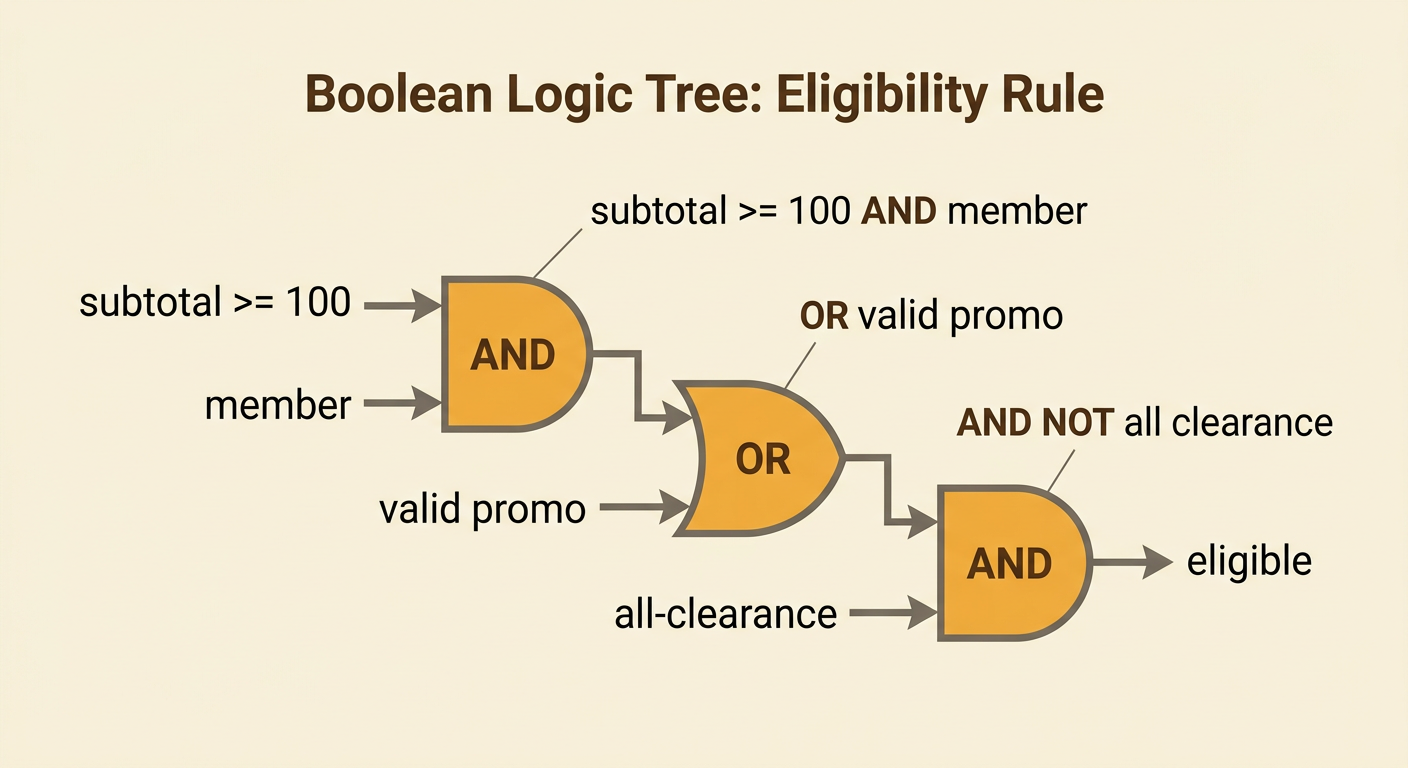
Boolean operators combine smaller conditions into one eligibility rule. AND is true only when both connected conditions are true. OR is true when at least one connected condition is true. NOT reverses true and false. For the store policy, write eligible = ((subtotal >= 100 AND member) OR validPromo) AND NOT allClearance. Parentheses show which conditions are grouped and prevent the rule from being misunderstood. A $130 member without a promo code passes because the subtotal condition and membership condition are both true. A nonmember with a $60 subtotal can pass by using a valid promo code. However, an order containing only clearance items fails in both cases because NOT allClearance becomes false. Evaluate the expressions inside the innermost parentheses first, then apply the final AND condition.
Write If/Else Pseudocode
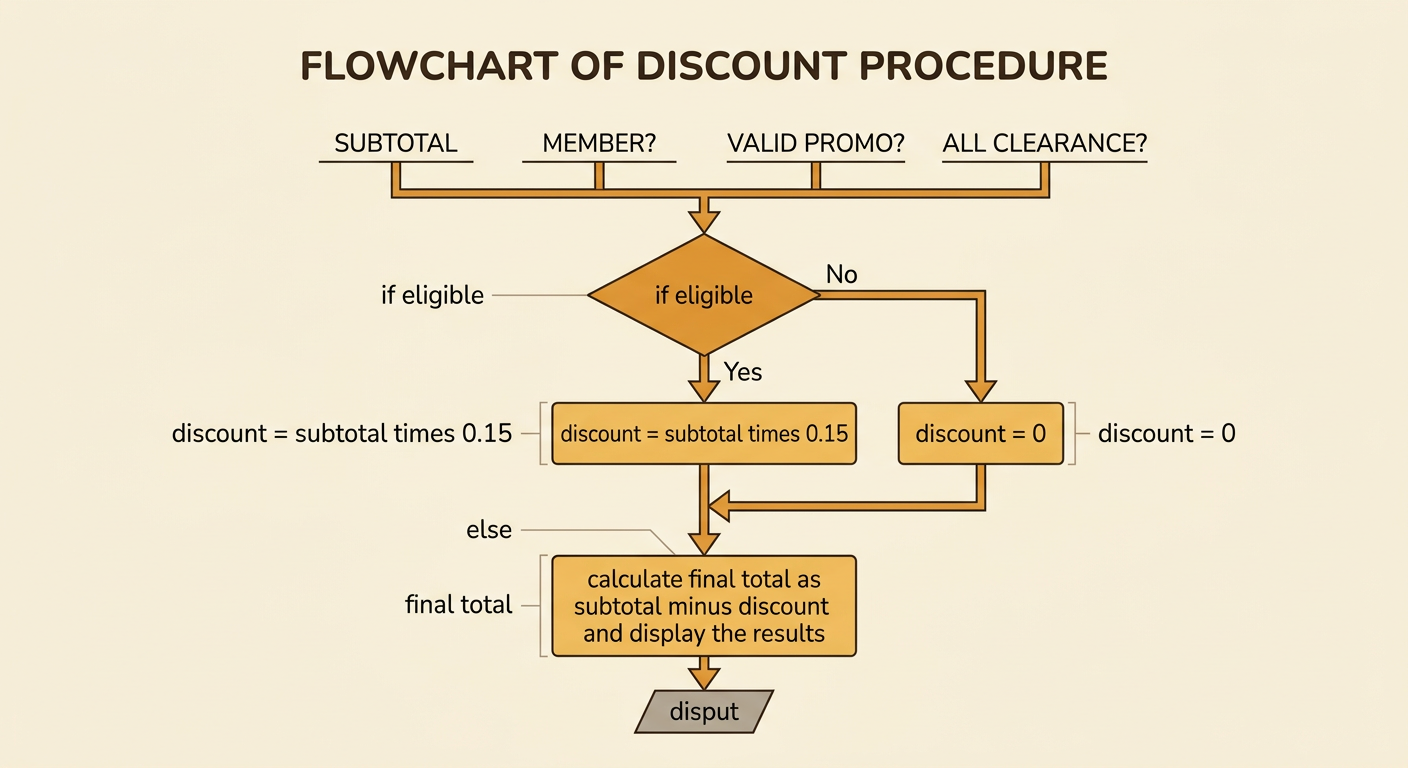
Pseudocode describes program steps without requiring the exact syntax of a programming language. First compute eligibility, and then use an if/else structure to choose an outcome. A clear procedure is: set eligible to ((subtotal >= 100 AND member) OR validPromo) AND NOT allClearance. If eligible is true, set discount to subtotal times 0.15. Otherwise, set discount to 0. Finally, set finalTotal to subtotal minus discount and display the three outputs. Follow the steps in order because finalTotal depends on the discount already being calculated. For example, suppose subtotal is $80, member is false, validPromo is true, and allClearance is false. Eligibility is true, the discount is $12, and the final total is $68. An else branch ensures that every ineligible order receives a defined discount of zero.
Test Boundary and Edge Cases
Testing should include ordinary examples, exact boundaries, and unusual combinations. The main boundary is $100 because subtotal >= 100 changes from false to true there. Test $99.99, $100, and $100.01 for members without promo codes; the expected eligibility results are false, true, and true when the orders are not all clearance. Also test a $0 subtotal, a nonmember with a valid promo code, and an all-clearance order that otherwise qualifies. The clearance exclusion should make the last case ineligible. Create a table listing inputs, predicted output, actual output, and pass or fail. Predictions help reveal whether the written rule matches the policy before code is trusted. If a $100 member is rejected, the programmer may have used > instead of >=. Edge-case testing catches small operator errors that ordinary examples can miss.

Evaluate Benefits and Costs
A correct program can still represent a policy with economic tradeoffs. The store may gain additional sales, customer loyalty, and larger average orders because shoppers have an incentive to reach $100. The cost is the revenue given up through the 15% discount. Marginal analysis considers the added benefit and added cost of one more qualifying purchase. For a $120 order, the direct discount cost is $18. If the promotion caused a customer who planned to spend $90 to spend $120, the store gained $30 in sales but also granted the discount; inventory costs and future loyalty also matter. The rule may disadvantage nonmembers or encourage unnecessary spending. Promo-code sharing could increase costs, while excluding all-clearance orders protects already reduced margins. Decision makers should compare test data, profit estimates, customer access, and policy goals before keeping or revising the rule.